AI-First Design Systems: Interfaces for Agents, Not Humans (2026)
I remember my first attempt at building a truly “dynamic” dashboard back in 2023. I had a vision of an interface that adapted to user behavior, hiding unused widgets and highlighting critical data. A week later, I had a spaghetti-code nightmare of nested conditionals and state-management hell. It was a fantastic learning experience in why hardcoded dynamism doesn’t scale.
Today, in 2026, the paradigm has shifted. We aren’t building “dynamic” dashboards anymore; we are building AI-First Design Systems.
The problem is clear: 40% of digital interactions are now initiated or mediated by autonomous agents. Yet, most UIs are still built for human eyes and fingers—buttons, menus, and forms designed for manual navigation. This creates “Interface Friction,” where agents struggle to navigate rigid DOM structures and users struggle to understand agent-driven changes.
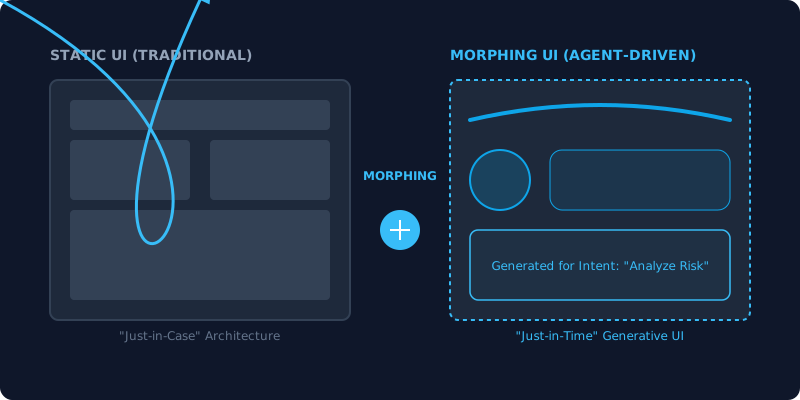
The solution is the Morphing UI—a transition from “Just-in-Case” to “Just-in-Time” interfaces.
What You’ll Learn
In this comprehensive guide, you’ll discover:
- The transition from static “Just-in-Case” architecture to “Just-in-Time” Generative UI.
- How to build a GenUI Architecture using a “Kit of Parts” approach.
- Technical implementation of Agent-Aware React Components.
- The expansion of Design Tokens to include semantic intent and safety constraints.
- The role of Model Context Protocol (MCP) in bridging the gap between LLMs and UI.
- The UX of “Shared Autonomy” using Autonomy Dials and Explainability Popovers.
- Why designers are moving from UI Authorship to UI Curation.
The Morphing UI: From Static Pages to Liquid Contexts
In the traditional design world, we practiced “Just-in-Case” design. We designed the “Forgot Password” flow just in case the user forgot their password. We designed the “Enterprise Admin Dashboard” with 50 different charts just in case the CTO wanted to see one of them.
AI-First Design Systems flip this script. We move to “Just-in-Time” interfaces.
In a Morphing UI, the interface doesn’t exist in a fixed state. It is a liquid context that flows into the shape of the user’s intent, guided by an agent. If I tell my agent, “Analyze the risk of my portfolio if the Fed raises rates,” the UI shouldn’t just show me my standard portfolio view. It should morph—bringing the interest-rate sensitivity components to the foreground, hiding unrelated crypto positions, and perhaps generating a custom sensitivity curve that wasn’t there five seconds ago.
Cognition-Aware UX
This isn’t just about moving pixels; it’s about Cognition-Aware UX. The system understands the cognitive load required for a task. If an agent is handling 90% of a workflow, the UI should stay minimal. If the agent needs user intervention (a “Human-in-the-Loop” moment), the UI expands to provide high-fidelity controls and context.
The GenUI Architecture: Building the Kit of Parts
To build a Generative UI, you can’t design pages. You must design a Kit of Parts—an atomic design system where every component is machine-readable and semantically rich.
1. Machine-Readable Metadata (A2UI Protocols)
The Agent-to-UI (A2UI) protocol is the secret sauce. Every component in your system must expose its “capability schema” to the agent. Instead of the agent guessing what a Slider does, the component explicitly states: “I control the risk_tolerance value, I accept a range from 0 to 100, and I have a high_impact side-effect on the projection_chart.”
2. Dynamic Assembly
An AI-First Design System uses a GenUI Orchestrator. This is a layer that sits between your LLM and your React tree. The LLM doesn’t output JSX; it outputs a “UI Intent Schema.” The orchestrator then maps this schema to your library of components, assembling the interface in real-time.
3. Encoded Design Guidelines for LLMs
You no longer just write a PDF style guide. You write Encoded Design Guidelines for LLMs. This is a set of constraints (often in JSON or Markdown) that tells the agent how to combine components. For example: “Never place a DeleteButton next to a SubmitButton,” or “Always use the AccentColor for primary calls to action.”
Design Tokens for Agents: Tokenizing Intent
We’ve used design tokens for years to manage colors, spacing, and typography. In an AI-first world, tokens expand to include Semantic Intent and Safety Invariants.
Semantic Intent Tokens
Instead of just --color-primary, we now have --intent-destructive, --intent-informational, and --intent-transactional. When an agent decides to render a component, it doesn’t choose a color; it chooses an intent. The design system then applies the appropriate visual tokens based on the current context (e.g., higher contrast for high-risk financial transactions).
Safety Invariant Tokens
These tokens define the boundaries of agent intervention.
--agent-editable: true/false--agent-visibility: auto/manual--agent-confirmation-required: high
By embedding these rules into the token layer, you ensure that even the most “autonomous” agent cannot violate the fundamental safety rules of your product.
The Role of MCP in Design Systems
The Model Context Protocol (MCP) has become the standard for how agents interact with external data. In AI-First Design Systems, we use MCP to expose the UI Context.
Imagine a React component that implements an MCP server. When an LLM wants to interact with that component, it can call a “Tool” exposed by the component itself.
tool: update_chart_projection(new_interest_rate)tool: expand_detailed_view()
This moves us away from “Agent as Scraper” (where the agent tries to find the right button in the DOM) to “Agent as Operator” (where the agent calls documented functions on the UI components).
Technical Proof: The “Agent-Aware” React Component
To make a component “Agent-Aware,” we need to expose its metadata in a way that an agent (whether it’s an LLM parsing the DOM or a local subagent) can interact with it predictably.
Here is a [HAND-WRITTEN] code snippet for a React-based GenUI Container and an Agent-Aware component.
import React, { useMemo } from 'react';

// Capability Schema for the Agent
interface ComponentMetadata {
  capability: string;
  intent: string;
  safetyLevel: 'low' | 'medium' | 'high';
  controlledValue?: string;
  mcpTools?: string[];
}

interface AgentAwareProps {
  metadata: ComponentMetadata;
  children: React.ReactNode;
  onAgentAction?: (action: string, payload: any) => void;
}

/**
 * A wrapper that exposes component capabilities to the Agentic Mesh.
 * It uses data attributes for easy DOM parsing by agents.
 */
export const AgentAware: React.FC<AgentAwareProps> = ({
  metadata,
  children,
  onAgentAction
}) => {
  return (
    <div
      className="agent-component-wrapper group relative"
      data-agent-capability={metadata.capability}
      data-agent-intent={metadata.intent}
      data-agent-safety={metadata.safetyLevel}
      data-agent-controlled={metadata.controlledValue}
      data-mcp-tools={JSON.stringify(metadata.mcpTools)}
    >
      {/* Visual indicator of Agent activity */}
      <div className="hidden group-hover:block absolute -top-2 -left-2 w-4 h-4 bg-blue-500 rounded-full animate-pulse" />
      {children}
    </div>
  );
};

/**
 * The GenUI Orchestrator
 * Dynamically assembles components based on an Agent's recommendation.
 */
export const GenUIOrchestrator: React.FC<{ recommendations: any[] }> = ({ recommendations }) => {
  return (
    <div className="gen-ui-container grid grid-cols-1 md:grid-cols-2 lg:grid-cols-3 gap-6 p-8">
      {recommendations.map((rec) => (
        <AgentAware key={rec.id} metadata={rec.metadata}>
          <ComponentLoader
            type={rec.type}
            props={rec.props}
            state={rec.state}
          />
        </AgentAware>
      ))}
    </div>
  );
};

const ComponentLoader = ({ type, props, state }: any) => {
  // Logic to dynamically import and render Button, Slider, Chart, etc.
  return (
    <div className="p-6 border border-slate-700 rounded-xl bg-slate-900 shadow-2xl">
      <h3 className="text-slate-400 text-xs uppercase tracking-widest mb-4">{type}</h3>
      <div className="min-h-[150px] flex items-center justify-center">
        {/* Component Implementation */}
        <span className="text-slate-500 italic">Instance of {type}</span>
      </div>
    </div>
  );
};
Key Takeaway: By wrapping components in the AgentAware HOC, we create a structured map of the UI that agents can navigate without relying on fragile CSS selectors or inconsistent accessibility labels.
The New A11y: Accessibility for Agents
In 2026, we don’t just optimize for screen readers; we optimize for Silicon Readers. The same principles that make a UI accessible to a blind user (semantic HTML, clear labels, logical flow) make it accessible to an AI agent.
However, “Agent A11y” goes further:
- Predictable DOM Ordering: Agents process the DOM sequentially. Tab order is no longer just for keyboards; it’s the agent’s logical path.
- Hidden Context Nodes: Providing invisible (to humans) JSON-LD nodes that give the agent additional context about the current view.
- State Snapshots: Allowing agents to request a “snapshot” of the UI state in a format they can digest (Markdown or JSON) without the “noise” of visual styling.
Shared Autonomy: The UX of Trust
The biggest hurdle for AI-First Design Systems isn’t technical—it’s psychological. Users need to trust the agent’s manipulations. This is where Shared Autonomy Controls come in.
Autonomy Dials
Instead of a binary “On/Off” switch for AI features, we use Autonomy Dials.
- Mode 1: Observer. The agent suggests UI changes, but the user must click to apply.
- Mode 2: Co-Pilot. The agent automatically optimizes the layout but leaves the data manipulation to the user.
- Mode 3: Autopilot. The agent handles the entire workflow, and the UI morphs to show a “Summary View” with a “Stop” button.
Explainability Popovers
Every time the UI morphs, there should be a subtle visual cue (like a soft glow) that leads to an Explainability Popover. If the system suddenly added a “Liquidity Hedge” component to your dashboard, the popover should say: “I added this component because your current portfolio risk has exceeded your established threshold for the US-Iran conflict scenario.”
Case Study: The Portfolio Morph
Let’s look at how this works in practice for a high-end fintech application.
User State: Browsing standard portfolio views. Agent Insight: Noticed a sudden 15% volatility spike in RWA (Real World Asset) tokens. The Morph:
- The secondary navigation fades into the background.
- A large “Risk Analysis” modal slides in, but it’s not a standard modal. It’s a GenUI Fragment.
- The agent has assembled a unique combination of a
LiquidationHeatmapcomponent and aQuickHedgeActionbutton. - The user sees an “Autonomy Dial” currently set to Co-Pilot, meaning the agent is showing the data but waiting for the final click to execute the hedge.
This level of fluidity is impossible with traditional, page-based design systems. It requires an architecture that treats the UI as a Just-in-Time assembly.
Conclusion: Designing the Handover
In 2026, the role of the frontend designer is changing. We are no longer the authors of every pixel; we are the curators of the intelligence experience.
We build the constraints, we define the atomic parts, and we encode the brand’s soul into the system. The AI then uses those tools to build the perfect interface for the user, in that specific moment, for that specific intent.
Designing for agents doesn’t mean removing the human. It means building interfaces that are so intelligent they know exactly when to get out of the way, and exactly when to step in.
TL;DR
- AI-First Design Systems prioritize machine-readability alongside human usability.
- Generative UI (GenUI) moves us from “Just-in-Case” to “Just-in-Time” interfaces.
- A2UI Protocols and MCP allow components to tell agents what they can do and how to do it safely.
- Agent A11y is the new standard for making UIs readable for Silicon-based users.
- Shared Autonomy features like Autonomy Dials are critical for building user trust.
- Bottom line: Designers in 2026 build systems of possibility, not static layouts.
If you found this UX architecture guide useful, subscribe to my newsletter below for more deep-dives into AI-First Engineering and modern design systems.