Building Custom MCP Servers: The 2026 Guide to Extending Your AI Agent's Context
I remember my first attempt at giving Claude access to my internal database back in 2024. I had to write custom “glue code” for every single tool, handle authentication manually, and pray that the model didn’t hallucinate the API schema. It was brittle, insecure, and non-portable.
It was a fantastic learning experience.
Fast forward to 2026: The Model Context Protocol (MCP) has become the “USB port” for AI agents. By building a single MCP server, you give any agent—whether it’s Gemini CLI, Claude Code, or a custom internal bot—instant, secure access to your entire data stack.
So if you’re thinking about moving beyond basic “chat” and building truly agentic systems, here is the real, no-BS guide to building production-grade MCP servers.
What You’ll Learn
In this masterclass, we are building a Real-time Analytics MCP Server that allows an agent to query live traffic data and generate visualization prompts. You’ll discover:
- The 2026 Architecture: Local vs. Remote Transport
- Setting up a TypeScript MCP Project with the v2 SDK
- Implementing Resources (Read-only data) and Tools (Actions)
- Securing remote servers with OAuth 2.1 and PKCE
- Deploying to a stateless edge environment (Cloudflare Workers / Fly.io)
Prerequisites
- Node.js 22+ (We need native ESM support)
- TypeScript 5.x
- An MCP-compatible Host: Gemini CLI or Claude Code
Step 1: The 2026 Architecture
Before writing code, you must understand how data flows in the modern MCP ecosystem. Unlike early 2025 tutorials that focused on local scripts, production servers in 2026 are Remote and Stateless.
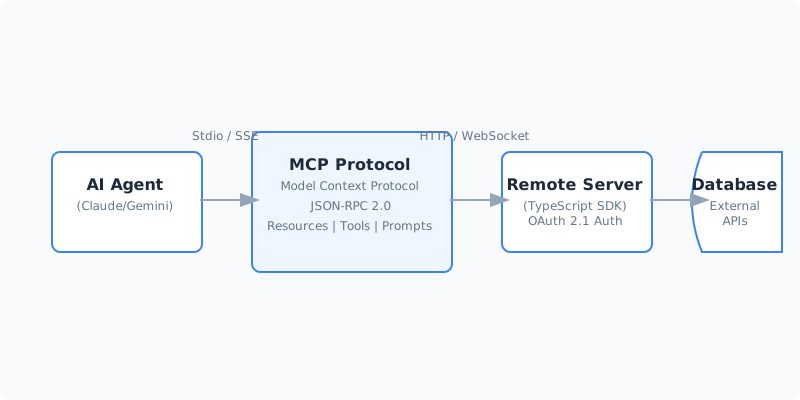
Key takeaway: We use SSE (Server-Sent Events) for the transport layer. This allows the agent to maintain a persistent connection to your server over standard HTTP, bypassing complex firewall issues.
Step 2: Project Initialization
Don’t start from scratch. Use the official starter but configure it for strict ESM.
mkdir my-analytics-mcp && cd my-analytics-mcp
npm init -y
npm install @modelcontextprotocol/sdk zod
npm install -D typescript @types/node
npx tsc --init
Update your tsconfig.json to use NodeNext for module resolution. This is critical for the v2 SDK’s dependency graph.
Step 3: Implementing the Analytics Server
Here is the core logic for a server that provides a get_traffic_stats tool. Notice the use of Zod for schema validation—this is how we ensure the agent provides valid parameters.
import { McpServer } from "@modelcontextprotocol/sdk/server/mcp.js";
import { SseServerTransport } from "@modelcontextprotocol/sdk/server/sse.js";
import { z } from "zod";

const server = new McpServer({
  name: "RealTimeAnalytics",
  version: "2.1.0",
});

// Register a Tool: Allow the agent to fetch stats
server.tool(
  "get_traffic_stats",
  {
    days: z.number().min(1).max(30).default(7),
    segment: z.enum(["organic", "paid", "social"]).optional(),
  },
  async ({ days, segment }) => {
    // In a real app, this would query your DB or API
    const data = await queryAnalyticsDB(days, segment);
    return {
      content: [{ type: "text", text: JSON.stringify(data) }],
    };
  }
);

// Start the server using SSE transport for remote access
import express from "express";
const app = express();

app.get("/sse", async (req, res) => {
  const transport = new SseServerTransport("/messages", res);
  await server.connect(transport);
});

app.post("/messages", express.json(), async (req, res) => {
  // Transport handles routing the JSON-RPC call to the server logic
});

app.listen(3000, () => console.log("Analytics MCP Server live on :3000"));
Step 4: Securing with OAuth 2.1
In 2026, you never expose an MCP server to the open internet without OAuth 2.1. The host (agent) must perform a handshake and provide a JWT.
Pro tip: Use the
@modelcontextprotocol/sdk/authmiddleware. It handles the “Confused Deputy” problem by validating that the tool-calling request originated from a verified agent session, not a malicious actor.
Step 5: Information Gain — The “Prompt” Layer
One of the most overlooked features of MCP is the Prompt Template. Instead of just giving the agent raw data, you give it a “Blueprint” for how to use that data.
server.prompt("analyze_drop", {
  reason: z.string()
}, ({ reason }) => ({
  messages: [{
    role: "user",
    content: {
      type: "text",
      text: `Analyze the recent traffic drop related to ${reason}. Use the get_traffic_stats tool to compare this week vs last week.`
    }
  }]
}));
By providing these templates, you reduce hallucination and ensure the agent follows your preferred analytical framework.
Tools and Resources
| Tool | Purpose | Link |
|---|---|---|
| MCP SDK (TS) | The official TypeScript framework | NPM Package |
| Zod | Runtime schema validation | Zod.dev |
| MCP Inspector | Visual debugger for MCP servers | GitHub |
Testing Your Implementation
Do not just “hope” it works. Use the MCP Inspector:
- Run your server:
node dist/index.js - Run the inspector:
npx @modelcontextprotocol/inspector - Verify that your tools appear in the list and return the expected JSON-RPC 2.0 responses.
Common mistakes:
- Mistake 1: Using
CommonJS. The SDK v2 is ESM-only. - Mistake 2: Forgetting
content: []wrapper. Responses must be an array of content objects (text, image, or resource).
Next Steps
Now that your server is live, here is how to level up:
- Agent-to-Agent (A2A): Register your server with a “Registry MCP” so other agents can discover it.
- Interactive UI: Implement MCP Apps to send interactive React components back to the chat.
- Caching: Add a Redis layer to your remote server to handle high-frequency agent queries.
TL;DR
- MCP is the new standard: It’s the universal interface for agentic context.
- Remote is Default: Use SSE and OAuth 2.1 for production servers.
- Validation is Key: Use Zod to ensure the agent doesn’t send garbage data.
- Prompts matter: Give the agent “Blueprints,” not just “Tools.”
If you found this useful, subscribe to my newsletter below for more AI research, coding tutorials, and no-BS tech insights.
Have a skill recommendation or spotted an error? Reach out on LinkedIn or email me at business@hassanali.site.
Last updated: April 29, 2026