Morphic UIs in Practice: React Patterns for Interfaces That Think
I remember when “smooth” meant a simple fade transition between two static pages. In 2026, that’s no longer enough. As we move toward AI-First Design Systems, the UI needs to be as fluid as the AI’s reasoning.
We are entering the age of the Morphic UI—interfaces that don’t just “show” data, but physically reshape themselves to match the user’s current cognitive task.
What You’ll Learn
In this technical guide, we’re going to build a functioning GenUI orchestrator using React 19 and Framer Motion.
- Shared Element Persistence: Using
layoutIdto bridge component gaps. - The Morphic Slot Pattern: A registry-based approach to dynamic assembly.
- Liquid Glass CSS: Achieving the 2026 “Morphic” look.
- Intent Buffering: Preventing “Layout Thrashing” during agent reasoning.
From Transitions to Morphing
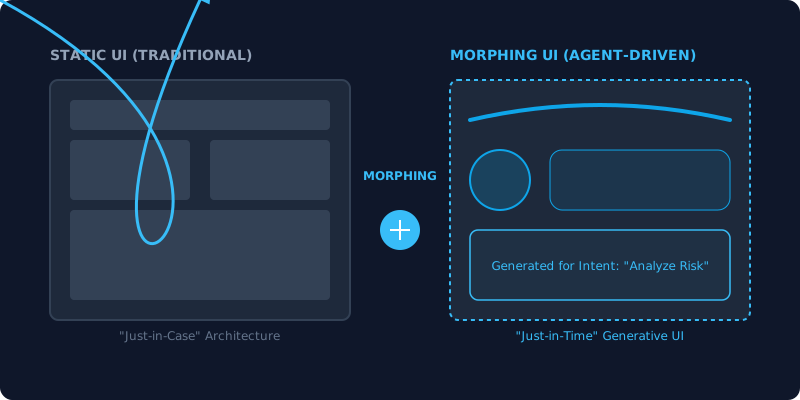
The fundamental difference between a 2024 UI and a 2026 Morphic UI is continuity.
In a traditional app, when you click “Analyze Risk,” the app takes you to a new page. In a Morphic UI, the “Analyze Risk” button itself might expand, its borders becoming the container for a new risk chart, while the surrounding text fades into a background “Glass” layer.
This isn’t just eye candy; it’s a critical part of shared autonomy UX. It maintains the user’s mental model by showing them exactly how the interface is transforming.
Pattern: The “Morphic Slot” Orchestrator
To build a UI that “thinks,” you need a centralized registry of components that your AI agent can invoke. We call this the Morphic Slot.
import { motion, AnimatePresence } from "framer-motion";

// 1. The Registry: Components are now 'Tools' for the Agent
const MORPHIC_REGISTRY = {
  SEARCH_RESULTS: (props) => <ResultsList {...props} />,
  RISK_HEATMAP: (props) => <LiquidationGraph {...props} />,
  CONFIRM_TRADE: (props) => <TransactionGuard {...props} />
};

export const MorphicSlot = ({ agentIntent, payload }) => {
  const Component = MORPHIC_REGISTRY[agentIntent];

  return (
    <div className="morphic-container relative">
      <AnimatePresence mode="wait">
        <motion.div
          key={agentIntent}
          layoutId="morphic-surface"
          initial={{ opacity: 0, filter: "blur(10px)", scale: 0.95 }}
          animate={{ opacity: 1, filter: "blur(0px)", scale: 1 }}
          exit={{ opacity: 0, filter: "blur(10px)", scale: 1.05 }}
          transition={{ type: "spring", stiffness: 300, damping: 30 }}
          className="morphic-card"
        >
          {Component ? <Component {...payload} /> : <IdleState />}
        </motion.div>
      </AnimatePresence>
    </div>
  );
};
Key Technique: By using layoutId="morphic-surface" on the container, Framer Motion will calculate the physical difference between the previous component’s size and the new one, “liquidly” morphing the background and borders.
Achieving the 2026 Visual Standard: Adaptive Glass
A Morphic UI shouldn’t look flat. It should feel like it has physical depth. We use Adaptive Glass—a combination of Glassmorphism and inner shadows—to create surfaces that feel like they are “projected” from the agent’s logic.
.morphic-card {
  background: rgba(255, 255, 255, 0.02);
  backdrop-filter: blur(32px) saturate(150%);
  border: 1px solid rgba(255, 255, 255, 0.08);
  box-shadow:
    inset 0 1px 1px rgba(255, 255, 255, 0.05),
    0 25px 50px -12px rgba(0, 0, 0, 0.5);
  border-radius: 32px;
}
Intent Buffering: Solving “Layout Thrashing”
One of the biggest user-centric problems in GenUI is “thrashing”—where the UI morphs too quickly as the agent changes its mind during reasoning.
To solve this, we implement Intent Buffering. The UI only commits to a morph after the agent’s intent has remained stable for at least 600ms.
// Simple Intent Buffer Hook
const [bufferedIntent, setBufferedIntent] = useState(null);

useEffect(() => {
  const handler = setTimeout(() => {
    setBufferedIntent(rawAgentIntent);
  }, 600);

  return () => clearTimeout(handler);
}, [rawAgentIntent]);
This simple check ensures that the morphic UI react patterns we use don’t become a source of motion sickness for the user.
Conclusion: Designing the Flow
Designing for 2026 means moving from “Screen Design” to “Flow Orchestration.” We are building containers for intelligence. When your React components are “agent-aware” and your layouts are morphic, you are no longer building a tool—you are building a reactive environment.
TL;DR
- Continuity is King: Use
layoutIdto keep users oriented during shifts. - Register your Parts: Build a registry of components that agents can assemble.
- Depth adds Meaning: Use Adaptive Glass to separate dynamic zones from static ones.
- Buffer the Intent: Don’t let agent “thinking” tokens cause layout thrashing.
Ready to see how these morphic patterns bridge the gap for users with disabilities? Check out my guide on Agentic Accessibility to see the crossover between AI and A11y.