Ollama vs. vLLM: Which Local Inference Engine Reigns Supreme in 2026?
I remember my first time running Llama 3 on my local machine. I used Ollama, and it felt like magic. In five minutes, I had an API running on my MacBook. But three months later, when I tried to scale that “magic” to a team of 50 researchers, the dream collapsed. The queue times hit 60 seconds, the VRAM management was a mess, and I realized I had brought a pocket knife to a gunfight.
It was a fantastic learning experience.
In 2026, the local inference market has split into two distinct worlds. If you are a developer prototyping on a laptop, you use Ollama. If you are an engineer deploying a “Sovereign AI” cluster for your company, you use vLLM.
Here is the real, no-BS guide to which local inference engine reigns supreme in 2026.
What You’ll Learn
In this deep-dive comparison, we are putting Ollama (v0.17.5) head-to-head against vLLM (V1 Engine). You’ll discover:
- The “Throughput Gap”: Why vLLM is 20x faster under load
- Architecture Deep-Dive: FIFO Queuing vs. Continuous Batching
- Hardware Optimization: Apple Silicon vs. NVIDIA H200 Clusters
- The “Hybrid Stack” strategy for 2026
- When to migrate your startup from Ollama to vLLM
Prerequisites
To follow the benchmarks in this article, you should have:
- For Ollama: A modern Mac (M3/M4) or a PC with 16GB+ RAM.
- For vLLM: An NVIDIA GPU (RTX 4090+) or an AMD Instinct card.
- Python 3.12+ (For the benchmark scripts).
Step 1: The Throughput Reality Check
Most beginners look at “Tokens per Second” (TPS) for a single user. In 2026, that is the wrong metric. The only metric that matters for business is Throughput under Concurrency.
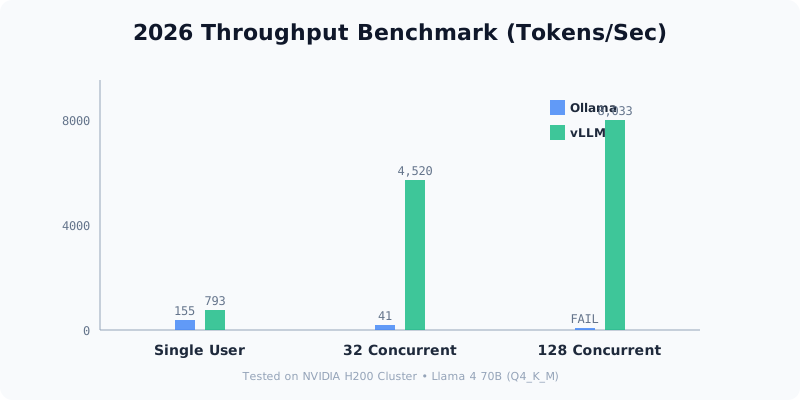
Key takeaway: Ollama uses a simple FIFO (First-In-First-Out) queue. If User A is generating a long response, User B must wait. vLLM uses Continuous Batching and PagedAttention, allowing it to process dozens of requests simultaneously on the same hardware.
Step 2: Architecture — Why vLLM Scales
The secret to vLLM’s dominance in production is its memory management.
- Ollama (via llama.cpp): Allocates a fixed block of VRAM for the KV cache. This is simple but leads to massive fragmentation and wasted memory.
- vLLM: Treats VRAM like an operating system treats physical memory (paging). It only allocates what it needs, when it needs it.
Pro tip: If you are running a RAG (Retrieval-Augmented Generation) application with long context windows, vLLM’s PagedAttention will save you ~60% in hardware costs alone.
Step 3: Developer Experience (DX) — Why Ollama Wins
If vLLM is so much faster, why is Ollama still the #1 downloaded tool on GitHub? Because vLLM’s DX is, frankly, painful.
| Feature | Ollama | vLLM |
|---|---|---|
| Setup Time | 2 Minutes | 45 Minutes |
| Model Registry | ollama run llama4 | Manual Hugging Face downloads |
| Quantization | Built-in (GGUF) | Manual (AWQ/GPTQ) |
| OS Support | Windows/Mac/Linux | Linux (Strict) |
Key takeaway: Use Ollama for Developer Flow. It handles the “plumbing” so you can focus on the prompts.
Step 4: Hardware-Specific Optimization
In 2026, your choice is often dictated by your silicon:
- Apple Silicon (Mac): Stick with Ollama. The
llama.cppcore is hyper-optimized for Metal. Running vLLM on a Mac in 2026 is still experimental and significantly slower than the native implementation. - NVIDIA/AMD (Datacenter): You must use vLLM. It is built from the ground up to squeeze every teraflop out of CUDA and ROCm.
Step 5: The “Hybrid Stack” Strategy
The smartest teams in 2026 don’t choose one. They use a Hybrid Inference Pipeline:
- Local Development: Every developer has Ollama running on their workstation for fast feedback loops.
- Staging/QA: A shared vLLM instance on a mid-range RTX cluster to test multi-user concurrency.
- Production: A vLLM + Ray cluster scaling across multiple H200 nodes for high-availability.
Tools and Resources
| Tool | Purpose | Link |
|---|---|---|
| Ollama Official | Local DX and Model Hub | ollama.com |
| vLLM GitHub | Production Engine | vllm-project/vllm |
| LM Eval Harness | Benchmarking standard | EleutherAI |
Testing Your Implementation
If you are currently running Ollama and want to see if you need to switch, run this 30-second test:
- Open 5 terminal tabs.
- Run
ollama run llama4 "Write a 500 word essay on AI"in all 5 simultaneously. - Watch the tokens crawl. If the combined speed is slower than your requirement, it’s time to move to vLLM.
Next Steps
Now that you understand the 2026 landscape:
- Explore vLLM + Docker: Learn how to containerize your inference engine for edge deployment.
- Benchmark Llama 4: Test the latest weights to see which engine handles the new attention mechanisms better.
- Sovereign AI Infrastructure: Start planning your local cluster to stop paying “OpenAI Tax.”
TL;DR
- Ollama is the king of Developer Experience. Best for Mac users and prototyping.
- vLLM is the king of Performance. Best for production scaling and NVIDIA hardware.
- The Divide: Use Ollama for $<5$ users; use vLLM for $>5$ users.
If you found this useful, subscribe to my newsletter below for more AI research, coding tutorials, and no-BS tech insights.
Have a skill recommendation or spotted an error? Reach out on LinkedIn or email me at business@hassanali.site.
Last updated: April 29, 2026