
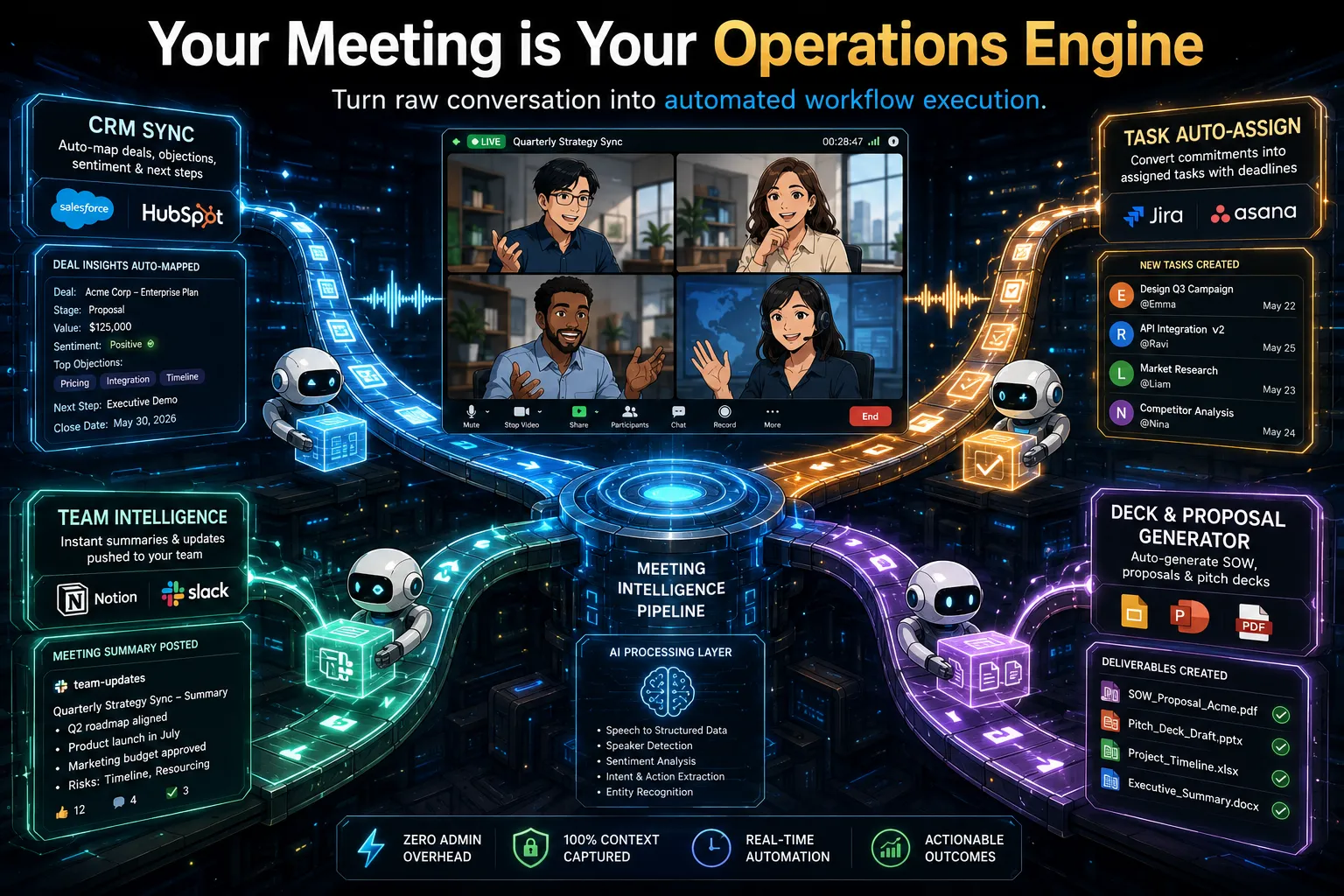
Finding the best premium AI note takers for teams isn’t just about finding a tool that can transcribe a conversation. In a professional corporate ecosystem, an enterprise-grade tool needs to act as an automated meeting intelligence hub. Teams need flawless audio quality, action-item isolation, strict data compliance, and deep integration into modern software stacks.
To cut through the marketing noise, I spent months conducting hands-on testing of the leading meeting intelligence platforms. Every tool featured below was evaluated using a standardized testing framework built on real-world team usage, data security protocols, and architectural efficiency.
Here is the ultimate, fact-checked breakdown of the seven best premium AI note-taking tools on the market today.
Not a team? If you’re a solo entrepreneur or freelancer, these tools are overkill. I’ve also ranked the 5 best free AI note takers — the winner isn’t even close.
The Standardized Testing Framework
To ensure absolute transparency, every tool in this guide was graded across five weighted operational categories:
- Features & Core Architecture (40%): How cleanly the software captures audio, handles speaker identification, and integrates into local or cloud environments.
- Data Security & Privacy (20%): Compliance standards (SOC 2, GDPR) and whether corporate data is shielded from public AI model training.
- Workflow Automation (15%): The strength of API connections, CRM integrations, and automated pipeline updates.
- Real-World Reliability (15%): Hands-on performance regarding transcription accuracy, background noise handling, and platform stability.
- Pricing & Team ROI (10%): The literal value metric—balancing seat costs against tangible administrative hours saved.
1. Summary AI
Best for: Professionals, business leaders, students, and remote teams seeking a mobile-first AI note taker that handles virtual meetings and everyday offline conversations.
Summary AI is a versatile AI note taking app designed for flexibility across mobile and web environments, capturing everything from live Zoom calls and in-person meetings to phone calls, lectures, and uploaded media files.
At a Glance:
🎯 Ideal for: Users who need a multi-purpose AI meeting note taker that works everywhere, from the browser to their mobile phone and Apple Watch.
⚡ Standout Strength: Live real time transcription and real time translation across 120+ languages, making multilingual conversations easier to follow.
⚠️ Main Limitation: Users looking for a basic meeting bot may not need all of the additional recording and summarization features.
💰 Pricing: Access all features under a single subscription (includes a 3-day free trial).
Key Capabilities & Workflow Integration
- Multi-Device Flexibility: Operates on mobile, web, and Apple Watch without requiring a phone or laptop on hand, making it ideal for capturing in-person meetings, phone calls, interviews, lectures, voice recordings, uploaded audio files, and videos.
- Live Transcription & Translation: Delivers instant real time transcription and real time translation in 120+ languages, helping everyone stay on track even when different languages are spoken.
- Structured Summaries & AI Chat: Converts every conversation into structured summaries, action items, key decisions, follow ups, and timestamps, while offering an interactive AI Chat to ask questions about the conversation, surface key insights, identify action items, or quickly find specific information without rereading the transcript.
- All-in-One Content Summarization: Features an integrated AI summariser suite capable of document summarisation, PDF summarisation, and video summarisation alongside standard meeting notes.
Platform & Value
- Single Subscription Value: Bundles phone call recording, AI transcription, and document tools into a single platform, eliminating the need to pay for multiple separate apps.
- Cross-Platform Synchronization: Ensures notes, transcripts, and summaries seamlessly sync across your web browser and mobile devices for instant retrieval anywhere.
The Blueprint Breakdown
- The Wins: Unmatched versatility across mobile, web, and wearable devices; live real-time translation for global teams; replaces multiple point solutions with one subscription.
- The Compromises: Users who primarily need meeting notes may not fully utilize all of Summary AI’s recording, transcription, translation, and summarization capabilities.
2. Jamie
Best for: Executives, consultants, and enterprise teams requiring privacy-first, bot-free meeting intelligence across online and in-person environments.
Jamie operates as a native, discreet AI note taker that streams system-level audio in real-time without storing audio files or injecting visible bots into calendar invites, delivering high-level executive summaries and structured task matrices.
At a Glance:
🎯 Ideal for: Leadership teams, regulated industries, and enterprise organizations needing confidential, cross-platform meeting intelligence.
⚡ Standout Strength: 100% bot-free live audio streaming with enterprise-grade security (SSO & SCIM) and zero stored audio recordings.
⚠️ Main Limitation: No video replay capability; free plan enforces session duration caps.
💰 Pricing: Standard from €24/user/month; Pro from €47/user/month; Enterprise custom pricing (billed annually).
Key Capabilities & Workflow Integration
- Native Bot-Free Audio Streaming: Bypasses third-party calendar bots entirely by streaming system audio directly in real-time on macOS and Windows across Zoom, Microsoft Teams, Google Meet, and Slack Huddles, ensuring no raw audio is ever recorded or stored.
- Online & In-Person Parity: Operates seamlessly across virtual video conferences and face-to-face boardroom discussions with single-click activation.
- Executive-Grade Summarization: Skips raw, noisy transcripts to synthesize concise executive briefings, topic-based notes, and actionable task matrices across 100+ languages.
- Cross-Meeting Context (Ask AI): Features an interactive assistant enabling users to query, analyze, and extract historical insights across their entire catalog of past discussions.
Data Security & Compliance Standards
- Enterprise-Grade Security & Access Governance: Fully supports SAML 2.0 Single Sign-On (SSO via Okta, Azure AD, etc.), SCIM automated user provisioning/deprovisioning, ISO 27001 certification, and customized data retention controls.
- GDPR-Compliant European Architecture: Built on strict EU data privacy standards with storage and processing housed entirely within European data centers.
- Zero Model Training & No Audio Retention: Streams audio for real-time processing without retaining stored audio files, while enforcing strict guarantees that customer data is never used to train public or foundational AI models.
The Blueprint Breakdown
- The Wins: Exceptionally polished executive summaries; 100% invisible capture during confidential calls; enterprise-ready infrastructure with SSO, SCIM, and ISO 27001; live audio streaming architecture ensures zero audio retention.
- The Compromises: Purely audio-streaming and text-focused without native video/audio playback; relies on a desktop application rather than a cloud-only bot.
3. Krisp
Best for: Remote teams and professionals requiring accurate bot-free meeting notes, live transcription, and clear audio enhancements.
Unlike traditional AI assistants that join calls as visible video bots, Krisp AI Meeting Note Taker doesn’t add a visible bot to the meeting (unless you choose to send a bot) and delivers real-time transcripts, structured meeting notes, and action items, supported by built-in noise cancellation and accent conversion.
At a Glance:
🎯 Ideal for: Professionals needing automated, bot-free meeting notes and live transcriptions.
⚡ Standout Strength: Device-level bot-free note taking with integrated audio cleanup. Works for in-person meetings, too: record the conversation with the Krisp mobile app to get transcripts and notes.
⚠️ Main Limitation: No permanent free plan; the mobile app doesn’t support noise cancellation.
💰 Pricing: From $8/user/month (billed annually).
Key Capabilities & Workflow Integration
- Bot-Free Note Taking and Transcription: Delivers live and post-meeting transcriptions without inserting virtual bots into your calls. Works seamlessly across Zoom, Microsoft Teams, Google Meet and Slack huddles.
- Automated Meeting Notes and Action Items: Automatically extracts key points, concise summaries, and assigned tasks from every call. It includes speaker labels and precise timestamps for quick review.
- Ask Krisp AI Engine: Enables users to query their meeting history directly through a chat interface. Quickly retrieve timelines, structural decisions, or specific project updates.
- Integrated Audio Enhancements: Combines real-time noise cancellation and accent conversion into the note-taking package to improve speech clarity and transcript accuracy.
Data Security & Compliance Standards
- On-Device Processing Safeguards: Noise suppression runs locally on your physical device. This prevents sensitive voice data from leaving your system during processing.
- Enterprise Security Framework: Meets SOC 2 Type II, HIPAA, and GDPR standards to protect enterprise meeting records and transcripts.
The Blueprint Breakdown
- The Wins: Delivers precise transcripts across multiple languages, automatically assigns speaker labels to action items, and operates without intrusive meeting bots.
- The Compromises: Advanced features rely on the local desktop application, and mobile apps lack full background noise cancellation controls.
4. Bluedot
Best for: Client-facing teams and professionals who need accurate meeting notes without a visible bot on the call.
Bluedot is a bot-free AI meeting assistant that records, transcribes, and summarizes meetings on Google Meet, Zoom, and Microsoft Teams. It works through a Chrome extension or native desktop app, capturing audio and video directly from your device. Nothing joins the call as a participant: other attendees see a normal meeting.
At a Glance:
🎯 Ideal for: Teams running external client calls, legal, financial, and sales professionals where a visible recording bot creates friction
⚡ Standout Strength: Bot-free recording with 100+ language support, private-by-default transcripts, and mobile apps for in-person capture
⚠️ Main Limitation: Free plan covers only 5 lifetime meetings, not a recurring monthly allocation
💰 Pricing: Basic from 20/user/month (billed annually)
Key Capabilities & Workflow Integration
- Extension-Based Recording: Captures video and audio through a Chrome extension or native app running on your device, with no third-party bot appearing in the attendee list. Works on Google Meet, Zoom, and Microsoft Teams.
- Tailored Summary Templates: Allows teams to create custom summary structures per meeting type, so sales teams pull client objections while engineering teams capture technical decisions from the same call.
- Direct CRM Syncing: Automatically pushes meeting notes and recording links into Salesforce and HubSpot on the Business plan. Also integrates with Slack, Notion, Zapier, and Make.
- AI Chat Across Meeting History: A built-in AI assistant lets you search across all past meetings using plain-language questions, returning timestamped answers without rewatching recordings.
- Multilingual Support: Transcription and AI summaries in 100+ languages for global and multilingual teams.
- Mobile Apps: iOS and Android apps extend coverage to in-person meetings and phone calls alongside video calls.
Data Security & Compliance Standards
- Privacy-First: Bluedot does not train AI models on your meeting recordings. Transcripts stay private until you choose to share them: nothing is automatically distributed to other participants.
- Encrypted Infrastructure: Data is encrypted in transit and at rest across all plans.
- Compliance: SOC 2 and GDPR compliant.
The Blueprint Breakdown
- The Wins: Bot-free recording across all major platforms; 100+ languages; privacy-first data handling; mobile apps for in-person capture; direct CRM integration on the Business plan.
- The Compromises: Free plan limited to 5 lifetime meetings; CRM integrations (Salesforce, HubSpot) require the Business plan at $32/user/month.
5. Otter.ai
Best for: High-volume operations, cross-functional teams, and live collaborative transcription environments.
Otter.ai remains a cornerstone of meeting intelligence, built specifically for teams that require rapid, live textual capture alongside robust real-time workspace collaboration.
At a Glance:
🎯 Ideal for: Cross-functional groups running fast-paced meetings with active talk tracks.
⚡ Standout Strength: Unmatched real-time, live text streaming and post-call chat queries.
⚠️ Main Limitation: Free version enforces strict monthly runtime constraints.
💰 Pricing: Pro plan starts from $8.33/user/month (billed annually).
Key Capabilities & Workflow Integration
- Flawless Live Streaming Text: Streamlines real-time tracking with an engine optimized to capture rapid speaker changes and dense technical monologues without lagging.
- Otter AI Chat Hub: Employs a post-call semantic agent allowing any team member to dynamically chat with the transcript to draft emails, generate project memos, or pull data.
- Workspace Separation Isolation: Features native directory tooling to divide transcript storage pools by specific internal departments or user workspaces.
- Elite In-Person Capture: Built with a top-tier mobile software framework that captures face-to-face boardroom discussions with the exact same accuracy as cloud calls.
Data Security & Compliance Standards
- Enterprise Architecture Controls: Provides centralized administrative management dashboards to oversee company-wide access permissions, single sign-on (SSO), and two-factor safety standards.
- Secure Infrastructure Hosting: Encrypts data pipelines in transit and at rest using modern corporate storage compliance methods.
The Blueprint Breakdown
- The Wins: Exceptional accuracy in fast multi-speaker dynamics, rapid generation of timestamped summaries, and an incredibly robust mobile app footprint.
- The Compromises: The user interface leans heavily into a text-first layout, which lacks the granular visual video snippet editing capabilities found in specialized video recorders.
6. Fathom
Best for: Professionals and mid-market organizations looking for frictionless CRM syncing and custom summary frameworks.
Fathom is a dominant force in the meeting assistant market, celebrated for a highly competitive feature suite that balances accessible core tools with comprehensive, business-grade AI features.
At a Glance:
🎯 Ideal for: Consultancies, recruiters, and small businesses requiring extensive post-call automation.
⚡ Standout Strength: Generous baseline options combined with robust CRM text-mapping.
⚠️ Main Limitation: Lacks structural in-person/offline processing metrics via standalone mobile apps.
💰 Pricing: Premium from 15/user/month (billed annually).
Key Capabilities & Workflow Integration
- Custom Framework Generation: Allows professionals to dictate the formatting of post-call summaries, transforming text records into tailored industry frameworks.
- Interactive “Ask Fathom” Module: Employs a ChatGPT-like utility localized within individual call profiles to instantly draft follow-ups or query conversation markers.
- Automated Field Mapping: Automatically updates and syncs key call data directly into specific matching fields within Salesforce and HubSpot.
Data Security & Compliance Standards
- Advanced Administrative Scoping: Higher tiers offer single sign-on (SSO), custom data retention rules, and full SOC 2 architectural parameters.
- Full End-to-End Encryption: Encrypts all internal call streams, transcripts, and storage records at rest and in transit.
The Blueprint Breakdown
- The Wins: High transcription accuracy (up to 90%), simple folder structures for team tracking, and direct integration with Asana for automated task creation.
- The Compromises: Custom templates and multi-user team collaboration directories remain restricted to higher-tier pricing licenses.
7. Supernormal
Best for: Agencies, consultants, and project managers requiring fast downstream deliverables like proposals and briefs.
Supernormal positions itself as more than a simple recorder, acting as a task and workflow management suite designed specifically to convert meeting contexts into finished business assets.
At a Glance:
🎯 Ideal for: Fast-moving agencies that focus heavily on immediate task execution.
⚡ Standout Strength: Automated creation of downstream briefs, pitch decks, and proposals.
⚠️ Main Limitation: Primarily desktop-optimized; scaling credit balances can fluctuate monthly.
💰 Pricing: Pro from 32/user/month (billed annually).
Key Capabilities & Workflow Integration
- Deliverable Drafting Agents: Uses pre-built business agents to translate call discussions directly into ready-to-execute sprint plans, pitch decks, or statements of work (SOW).
- Dynamic Follow-Up Automation: Analyzes verbal agreements during team syncs to construct immediate, actionable task outlines across workspace software.
- Flexible Capture Mechanisms: Supports calendar automation to auto-detect video calls alongside desktop utilities for flexible background tracking.
Data Security & Compliance Standards
- Isolated Storage Safeguards: Keeps local recordings securely stored on the device system folder to maintain privacy over early-stage strategic planning.
- Enterprise Verification Controls: Offers secure single sign-on (SSO), data retention policy settings, and comprehensive team audit logs.
The Blueprint Breakdown
- The Wins: Drastically cuts down post-call proposal writing times; features a highly intuitive, minimalist web directory layout with robust task filtering.
- The Compromises: Deep integration with expansive third-party automation tools via Zapier remains more manual compared to specialized sales engines.
The Premium Verdict: Which Tool Belongs in Your Stack?
Selecting the optimal AI note-taking architecture depends entirely on your specific organizational constraints:
- If your team requires an all-in-one generalist across live meetings, phone calls, uploaded audio, and cross-lingual translation, deploy Summary AI.
- If you need privacy-first, bot-free meeting intelligence with enterprise-grade security and executive summaries, deploy Jamie.
- If your priority is zero external cloud exposure and absolute audio clarity in noisy environments, deploy Krisp.
- If you run an agile team built completely inside Google Meet and Notion/Slack pipelines, deploy Bluedot.
- If your operations demand real-time, live collaborative text streams and heavy mobile/in-person capability, deploy Otter.ai.
- If you need custom summary frameworks with automated field-mapping straight into your sales pipeline, deploy Fathom.
- If you operate an agency that needs to instantly spin call summaries into proposals and decks, deploy Supernormal.