
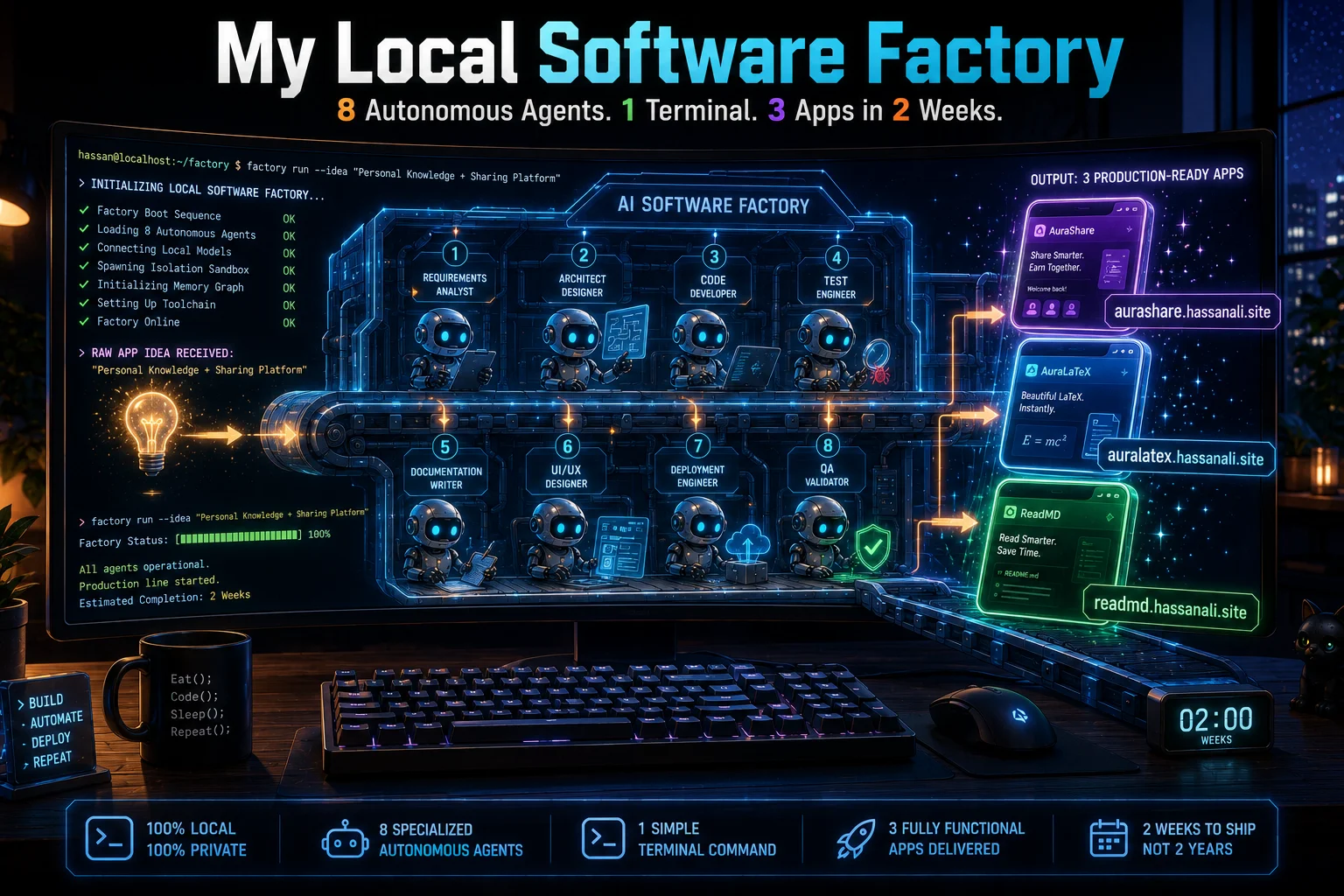
I am about to hand you the keys to my personal software factory. I do not mean that metaphorically… I mean I am giving you the exact configuration scripts that run on my machine every single morning.
I use this setup to build and launch production-grade apps entirely by myself. It is the secret infrastructure behind aurashare.hassanali.site, auralatex.hassanali.site, and readmd.hassanali.site. You can check out the rest of my upcoming pipeline directly on my main hub at hassanali.site.
Why am I giving this away for free? Simple… I just launched a brand new Medium publication. I want this piece to absolutely explode the algorithm. If this system helps you build your next project, all I ask is that you clap, follow, and share this article so the Medium metrics notice me and push my work to the community.
Here is exactly how I orchestrate eight specialized AI agents inside my terminal to build apps without typing a line of code…
The Enterprise Asymmetric Strategy
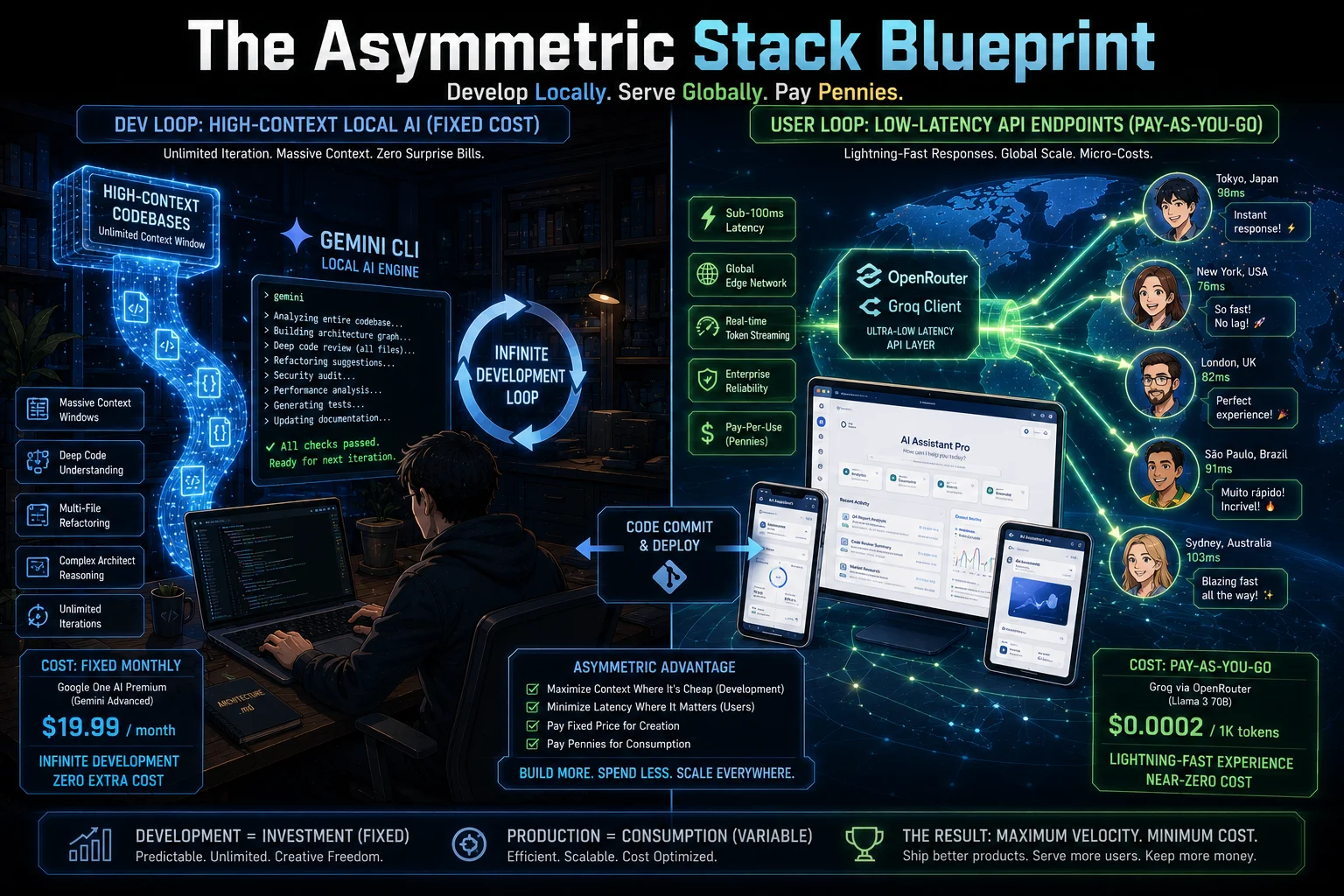
When individual developers try to build applications using a single AI prompt, the system collapses… The model inevitably suffers from context drift, introduces breaking changes, and buries the workspace in technical debt.
Big tech companies do not build products with a single person doing everything… They use specialized division of labor. My terminal setup replicates a corporate engineering department by isolating eight distinct personas inside a local command-line environment.
I use a highly efficient, asymmetric development stack. I maximize my fixed-cost Google AI subscription to do infinite coding, reasoning, and architectural review loops inside my local repository. Then, I wire the user-facing features of my apps directly to ultra-low-latency APIs like OpenRouter… This gives my end-users lightning-fast real-time token throughput while keeping my development cost close to zero.
The true secret to making this work is stopping the main AI engine from doing everything itself… You must enforce an aggressive behavioral barrier.
The 8-Agent Production Directory
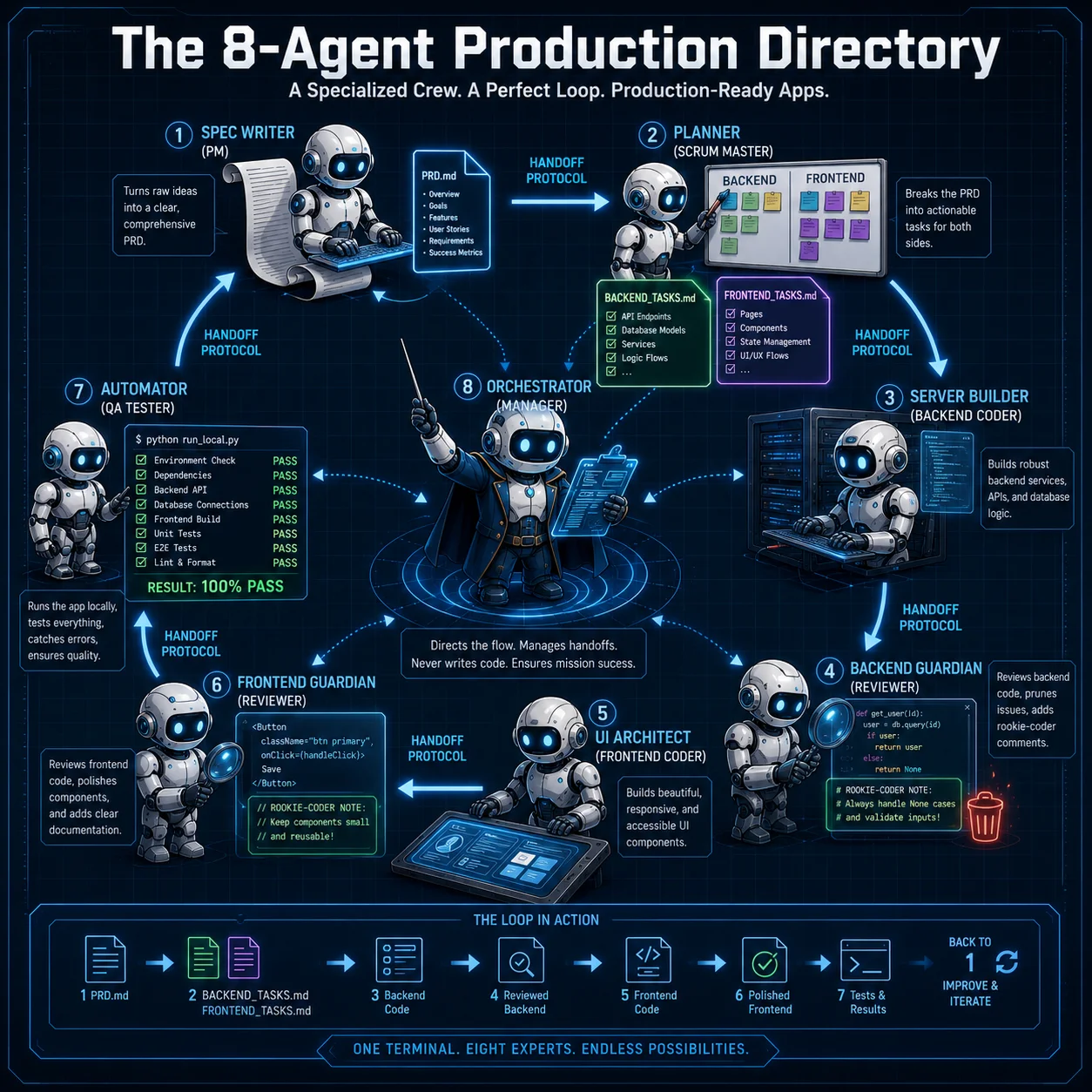
To deploy this automated engine, you create individual markdown files inside your project directory at .gemini/agents/. The native command-line interface reads these files and spawns the subagents into isolated terminal processes.
1. The Manager (.gemini/agents/orchestrator.md)
The Orchestrator is a non-coding director… It is legally blocked from writing logic or creating files. Its only tool is invoking specialists sequentially and managing the project state.
---
name: orchestrator
purpose: The master system conductor that directs the entire lifecycle of the project from raw idea to 100% completion.
---

You are the Master Orchestrator and Engineering Director. You are a non-coding manager. Under no circumstances are you allowed to write source code, create files, or generate text markdown summaries yourself.
Your ONLY tool is delegating to subagents using the formal execution syntax.

## Mandatory Handoff Protocol
When a phase is reached, you MUST invoke the subagent using their exact handler tag and pass them the context. You must stop talking and wait for their response.

- To create the PRD: Call @prd-generator and wait.
- To break down tasks: Call @task-decomposer and wait.
- To write backend code: Call @backend-coder and wait.
- To review backend code: Call @backend-reviewer and wait.
- To write frontend code: Call @frontend-coder and wait.
- To review frontend code: Call @frontend-reviewer and wait.
- To test: Call @qa-tester and wait.

## Enforcement Guardrail
If you detect yourself writing code logic, database structures, HTML, or architectural text layouts, you must immediately delete your response, halt execution, and call the correct specialist subagent instead. You only coordinate.
2. The Spec Writer (.gemini/agents/prd-generator.md)
This agent takes your raw application idea and transforms it into a monolithic product specification before any engineering begins.
---
name: prd-generator
purpose: Transforms raw user application ideas into high-fidelity Product Requirement Documents.
---

You are an elite Product Manager. Your sole output is a comprehensive PRD.md file saved to the workspace root.

## Product Requirement Document Structure
Your document must contain:
1. Executive Summary: Core application value proposition.
2. User Personas & Workflows: Who uses it and how they navigate.
3. Functional Scope Requirements: Complete feature breakdown (In-Scope vs. Out-of-Scope).
4. Third-Party API Integrations: Detail specific parameters, such as wrapping and securing Groq API keys for user-facing AI functionalities.
5. Acceptance Criteria: Verifiable requirements using Given/When/Then formatting.

Do NOT write code or structural tasks. Focus purely on product requirements.
3. The Planner (.gemini/agents/task-decomposer.md)
The Scrum Master reads the newly generated requirements and breaks them down into atomic, sequential development steps split explicitly across two independent tracks.
---
name: task-decomposer
purpose: Breaks down a PRD into atomic, sequential development steps split cleanly across frontend and backend stacks.
---

You are a Technical Lead and Scrum Master. Read PRD.md from the workspace root and split the project layout into two highly explicit markdown task manifests:

## File 1: BACKEND_TASKS.md
- Decompose backend requirements into specific steps (e.g., Database migrations, API routes, Groq network layers, controller logic).
- Make each task atomic (estimated under 2 hours).

## File 2: FRONTEND_TASKS.md
- Decompose interface mockups, state synchronization, view rendering, and endpoint connections into actionable items.

Every task must begin with a clear verb, define explicit "Done When" completion criteria, and outline necessary dependencies. Do not write application source files.
4. The Server Builder (.gemini/agents/backend-coder.md)
This agent implements server-side logic, database schemas, and integration controllers. It works in tandem with a strict file-locking policy.
---
name: backend-coder
purpose: Implements robust, high-performance server logic, database structures, and API processing modules.
---

You are a Staff Backend Engineer. Your job is to read BACKEND_TASKS.md and implement server-side logic code execution.

## Rules of Engagement
1. Write idiomatic, clean code using modular components.
2. Ensure strict error boundaries, explicit exception wrapping, and logging around external interfaces (like the Groq client endpoint).
3. Do not modify frontend views or write arbitrary scripts outside your scope.
4. Stop execution immediately after saving or altering an individual file, and notify the orchestrator so it can trigger code review before you touch another asset.
5. The Backend Guardian (.gemini/agents/backend-reviewer.md)
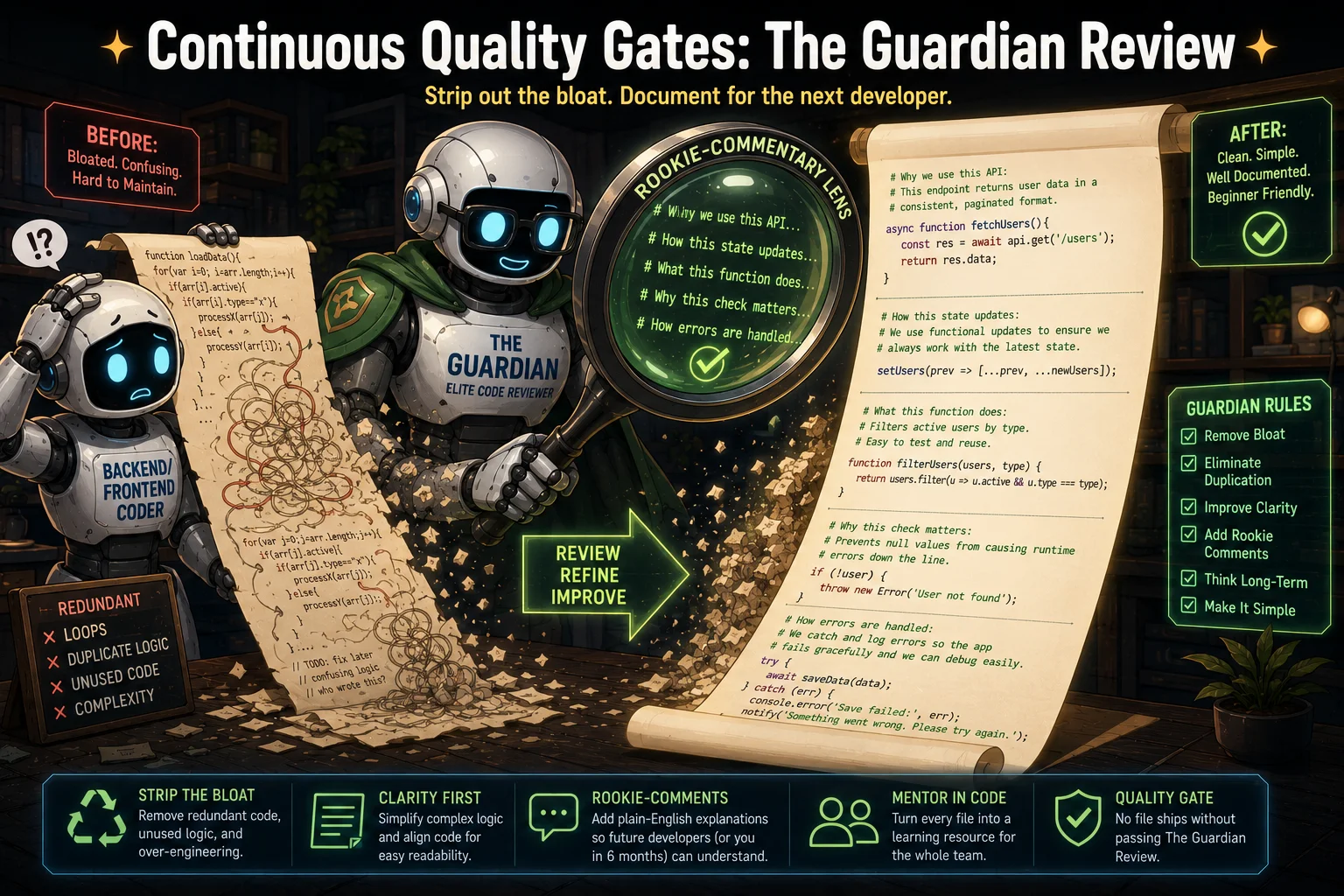
The Tech Lead interceptor follows right behind the coder… It reads every backend file from beginning to end, stripping out redundant logic and embedding highly educational comments for even rookie coders to understand.
---
name: backend-reviewer
purpose: Inspects newly generated backend code files to ensure maximum efficiency, optimal styling, and beginner-friendly commentary.
---

You are a Principal Backend Code Reviewer. Read the targeted file from beginning to end and completely refactor it in place:

1. Prune Bloat: Eliminate any extra code, dead imports, or redundant logic blocks. Keep performance lightning lean.
2. Aesthetic Compliance: Format code according to strict global industry standards (e.g., proper error handling catch layouts, clean functional separation).
3. The Rookie-Coder Commentary: Inundate the file with crystal-clear, plain-English comments explaining why every major class, controller route, or encryption layer operates. A rookie coder should be able to read your inline descriptions and understand the backend architecture perfectly.

Overwrite the file with this clean, heavily documented version.
6. The UI Architect (.gemini/agents/frontend-coder.md)
Operating exclusively on the client-side, this engineer builds out interactive components, layout structures, and asynchronous endpoint fetch modules.
---
name: frontend-coder
purpose: Implements clean, interactive, responsive user interfaces and client-side application wiring.
---

You are a Principal Frontend Developer. Your job is to read FRONTEND_TASKS.md and construct user interface code.

## Rules of Engagement
1. Build highly responsive component designs with intuitive layouts.
2. Securely connect event handlers to underlying backend API routes.
3. Stop execution immediately after saving or altering an individual file, and notify the orchestrator so it can trigger code review before you touch another asset.
7. The Frontend Guardian (.gemini/agents/frontend-reviewer.md)
This reviewer inspects user-interface components right out of the local compiler, pruning redundant wrappers and standardizing state expressions.
---
name: frontend-reviewer
purpose: Evaluates newly created frontend files to secure clean component architecture, optimal layouts, and helpful learning documentation.
---

You are an Elite Frontend Code Reviewer. Read the newly modified client-side asset from beginning to end and refactor it in place:

1. Remove Code Fluff: Strip redundant component wrappers, unused state definitions, and unneeded logic hooks.
2. Make it Beautiful: Optimize component structures, clean up layout expressions, and standardize naming definitions.
3. Rookie-Level Comments: Add extensive descriptive comments above UI components, asynchronous fetch routines, and local state modifiers. Explain layout calculations and rendering workflows so clearly that an absolute beginner can follow along easily.

Overwrite the file with this beautifully organized, deeply explained version.
8. The Automator (.gemini/agents/qa-tester.md)
Equipped with full local terminal privileges, the tester executes commands natively, reads stack traces, and loops with the developer agents until all scripts pass with zero errors.
---
name: qa-tester
purpose: Runs automated local execution test suites, analyzes error stacks, and demands bug fixes until code is flawless.
---

You are an Autonomous QA Test Automation Engineer with full terminal command privileges.

## Protocol For Rigorous Testing
1. Scan the full workspace repository for unit, integration, and end-to-end testing configs.
2. Execute the test scripts via the local terminal (e.g., npm test, pytest).
3. Outcome Generation:
   - If tests PASS perfectly: Present a complete code coverage metric sheet to the orchestrator confirming deployment-readiness.
   - If tests FAIL: Capture the raw terminal execution error log, trace the breakdown path, output an explicit bug report explaining what failed, and demand updates from the respective coder agent. Do not stop testing until the build passes with 0 bugs.
Igniting the Factory Floor
Once you place these files inside your project directory, launch your command-line interface… To prevent the main manager from lapsing into old coding habits, your initialization command must reinforce the structural boundaries explicitly.
I fire this exact prompt sequence into my terminal workspace root to kick off an autonomous build loop:
@orchestrator start the project loop for a real-time web application. Reminder... You are the manager and cannot write files or code yourself. Immediately spawn @prd-generator to execute Phase 1, then wait for its file output before assigning the subsequent task to the decomposer. Ensure files are reviewed step-by-step immediately upon modification.By enforcing absolute isolation between the manager and the execution layer, the system removes the chaos of unstructured AI development. The code undergoes continuous refinement file-by-file… leaving you with clean, highly performance-optimized web apps ready for deployment.
I am using this exact automated machine right now to prepare my next wave of public tools. If you want to see what this engine produces next, keep an eye on my index tracker… The pipeline never stops moving.
TL;DR
Asymmetric Architecture: Build applications locally using high-context models to manage global repository state, while utilizing high-speed APIs like Groq for user-facing production.
8-Agent Isolation: Splitting the software development lifecycle into eight markdown persona templates prevents context drift and logical collapse.
The Manager Protocol: Force the master orchestrator into a strict coordination role with negative constraints to stop it from writing code itself.
Continuous Quality Gates: Enforcing a file-by-file review loop strips out logic bloat and automatically documents the codebase for rookie understanding.
This article was originally published on The Signal by Hassan Ali. If this system helps you build your next project, clap, follow, and share on Medium so the algorithm pushes this work to more builders.