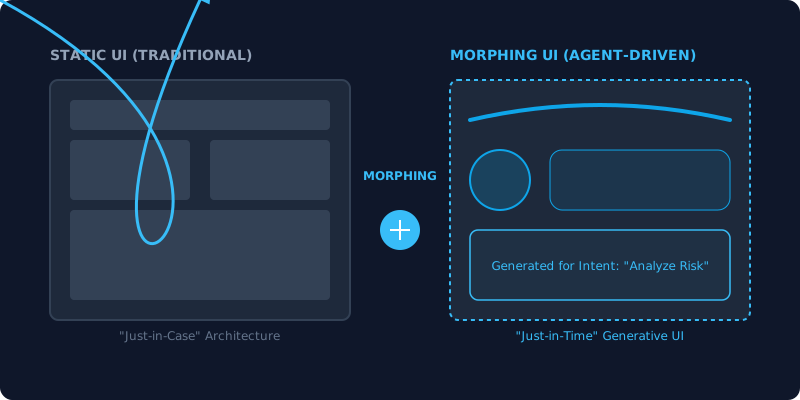
The Death of the Dashboard: Designing Action Centers for 2026
I recently logged into a popular project management tool and was greeted by 14 charts, 3 progress bars, and a “Global Feed” of 100+ notifications. I felt an immediate spike in cortisol. I didn’t want a “Global Feed”; I wanted to know which of my three high-priority tasks was blocked and how to fix it.
In 2026, we call this “Dashboard Fatigue.” And it’s the reason why the traditional SaaS dashboard is officially dead.
We are moving away from Systems of Record (dashboards you look at) and toward Systems of Action (agents you orchestrate). The best interface in 2026 isn’t the one with the most data; it’s the one that disappears because the work is already done.
What You’ll Learn
In this thought-leadership piece, we’re exploring the transition from observation to orchestration.
- Digital Autopsies: Why looking at the past is no longer enough for users.
- The Orchestration Layer: Designing the single, quiet window for agentic fleets.
- Cognitive Clarity: How to design for “Brain Time” rather than “Screen Time.”
- Action Centers: The minimal, intent-driven replacement for the homepage.
Dashboards are Digital Autopsies
Traditional dashboards tell you what happened after it’s too late to change it. They are autopsies of your data.
In the era of agentic engineering, we don’t need a red bar on a chart to tell us sales are down. We need an agent that has already identified the three expired contracts causing the dip, drafted the follow-up emails, and is now waiting for our thumb-up in a minimal Action Center.
The move from “What” to “Why” (and then to “Do”) is the fundamental shift of 2026 design.
Designing the Orchestration Layer
If the dashboard is dead, what replaces it? The Orchestration Layer.
Instead of 15 tabs of “sources of truth,” the user interacts with a quiet, adaptive workspace. This interface follows the Morphic UI pattern—it stays minimal when things are running smoothly and only “blooms” when an anomaly requires human intervention.

For example, in a sovereign HFT environment, a trader doesn’t watch 50 blinking charts. They watch a single “Health Dial.” If a micro-burst is predicted, the UI morphs to show the specific risk-hedge options. The goal is Insight Latency: Zero.
The New Metric: Available Brain Time
In 2024, we measured “Daily Active Users” and “Time on Site.” In 2026, those are anti-metrics.
The elite products of today measure Available Brain Time. How much mental energy did we save the user? How quickly did they reach their goal?
Designing for cognitive clarity means ruthlessly removing any data that doesn’t lead directly to an action. If a user has to “hunt” for a button, the design has failed. In an AI-First Design System, the agent “brings” the button to the user at the exact moment it’s needed.
Case Study: The Action Center
Let’s look at a modern CRM.
- The Old Way: A dashboard showing “Leads per Month” and “Revenue Pipeline.”
- The 2026 Way: An Action Center that says: “I have qualified 12 leads this morning. 3 of them are VIPs from the Fintech sector. I’ve scheduled initial calls for tomorrow afternoon. Confirm?”
The interface is a single card with a “Confirm All” button and an “Expand for Details” link. This isn’t just “automation”; it’s intent-driven UX.
Conclusion: The Interface of the Invisible
The “Death of the Dashboard” is a symptom of a larger trend: the invisibility of software. As agents become more capable, the UI moves from being the “Main Event” to being the Handover Layer.
Our job as designers is to ensure that this handover is seamless, trustworthy, and fast. We are no longer building tools for people to work with; we are building environments for people to work through.
TL;DR
- Dashboards are for the past: Use Action Centers to focus on the future.
- Record vs. Action: Shift your product from a storage vault to an execution engine.
- Clarity > Breadth: The best UI surfaces only what is necessary for the next decision.
- Bottom line: If your user is “hunting” for data, you’re still building in 2024.
Ready to build the technical components that make Action Centers possible? Revisit my guide on Morphic UIs in Practice to master the React patterns of 2026.