The Ultimate Local AI Stack: Building Your Sovereign Architecture (2026)
I remember my first attempt at building an autonomous coding agent. I had a grand vision of a completely hands-off developer. A week later, I hit an absolute wall: $400 in API bills, brutal rate limits, and the terrifying realization that I was piping my entire proprietary codebase to a server halfway across the world.
It was a fantastic learning experience. It taught me that renting intelligence is a fundamentally flawed business model for the indie hacker.
The era of defaulting to OpenAI or Anthropic for every trivial API call is over. In 2026, the competitive advantage belongs to engineers who control their own compute. This is the era of the local AI stack.
So if you’re thinking about transitioning away from the cloud and taking ownership of your cognitive infrastructure, here’s the real, no-BS guide to building a sovereign architecture that actually works.
What You’ll Learn (Building Your Local AI Stack)
In this article, you’ll discover:
- How to architect a complete, production-ready local AI stack.
- The truth about the performance gap between open-source SLMs and cloud monoliths.
- Step-by-step process for orchestrating models using Ollama and vLLM.
- How to connect your local models to your file system securely using MCP servers.
The Sovereign Architecture Paradigm
For the last three years, we’ve been conditioned to think of AI as a service. You send a payload, you pay a fraction of a cent, you get a string back. But as I covered in my analysis of the Gigawatt Ceiling, centralized compute is becoming a geopolitical bottleneck.
The local AI stack flips this model. It operates on the principle of Sovereign Intelligence: the idea that your reasoning engine should live as close to your data as possible.
Core Components of the Stack
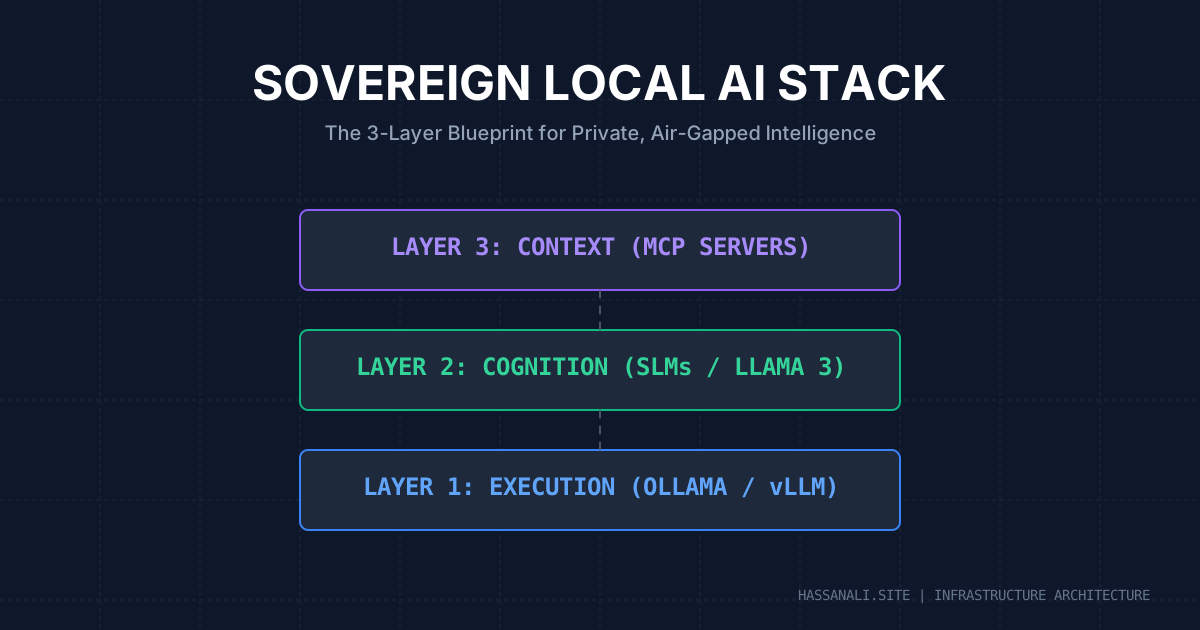
A true sovereign architecture requires three distinct layers:
- The Execution Layer: The runtime environment (e.g., Ollama, vLLM, Llama.cpp).
- The Cognitive Layer: The quantized weights of the model itself (e.g., Llama-3-8B, Mistral, Qwen).
- The Context Layer: The tools that bridge the model to reality, primarily using the Model Context Protocol (MCP).
Step 1: The Execution Layer (Ollama vs. vLLM)
You need a fast, reliable runtime to serve your models locally. Let’s compare the two titans of 2026.
If you are a solo developer running on a MacBook Pro or a single consumer GPU, Ollama remains the gold standard for developer experience. It wraps complex C++ bindings into a Docker-like UX.
However, if you are setting up a local inference server for a team, you need vLLM.
# Starting a local inference server with vLLM (OpenAI compatible)
python3 -m vllm.entrypoints.openai.api_server \
    --model meta-llama/Meta-Llama-3-8B-Instruct \
    --quantization awq \
    --gpu-memory-utilization 0.9 \
    --max-model-len 8192
Key takeaway: Start with Ollama for prototyping, but graduate to vLLM if you need high-throughput batching and strict OpenAI API compatibility. You can read my deep dive on Ollama vs vLLM benchmarks here.
Step 2: The Cognitive Layer (Choosing Your SLM)
The biggest myth of the AI boom was that you needed a trillion parameters to do useful work. In reality, Small Language Models (SLMs) in the 7B to 14B parameter range, heavily fine-tuned for specific tasks, easily outperform generalist cloud models for targeted engineering work.
Pro tip: Always use quantized models (GGUF or AWQ format) for local inference. A 4-bit quantized 7B model can run comfortably on 6GB of VRAM with minimal degradation in reasoning capability. If you are pushing the limits, check out my guide on running 70B models on 4GB GPUs.
Step 3: The Context Layer (MCP Servers)
An isolated brain is useless. To make your local AI stack powerful, it needs to read your files, query your database, and run your scripts. This is where the Model Context Protocol (MCP) becomes critical.
MCP standardizes how AI models request context. Instead of writing custom integration glue for every tool, you run local MCP servers that expose your environment via a secure JSON-RPC interface.
Common mistakes when setting up MCP:
- Mistake 1: Giving the model broad filesystem access instead of scoping it to the active project.
- Mistake 2: Running MCP servers with write-access enabled during initial testing.
- Mistake 3: Forgetting to set up proper local environment variables for the MCP hosts.
If you want to build your own custom context bridges, see my comprehensive tutorial on building custom MCP servers.
Tying It All Together
Once your local AI stack is operational, the workflow shifts dramatically. You are no longer paying a tax on every thought. You can run hyper-aggressive Agentic SEO loops or massive data scraping pipelines overnight without worrying about an API bill destroying your margins.
You trade convenience for control. In an era of increasing censorship, downtime, and data harvesting, control is the most valuable asset you can own.
Next Steps
Now that you’ve understood the architecture of a local AI stack, here’s what to do next:
- Install Ollama and pull your first 8B model.
- Configure your IDE (like Cursor or VS Code) to point to
localhost:11434instead of the cloud API. - Review my Agent Skills Guide to learn how to structure prompts specifically for local models.
TL;DR
- Key point 1: A local AI stack guarantees data privacy and eliminates unpredictable API costs.
- Key point 2: The modern sovereign architecture consists of Execution (Ollama/vLLM), Cognition (SLMs), and Context (MCP).
- Key point 3: Small, quantized models (7B-14B) running locally can rival cloud monoliths for specific engineering and writing tasks.
- Bottom line: Owning your compute is the ultimate competitive advantage in 2026. Stop renting intelligence.
If you found this useful, subscribe to my newsletter below for more AI research, coding tutorials, and no-BS tech insights.