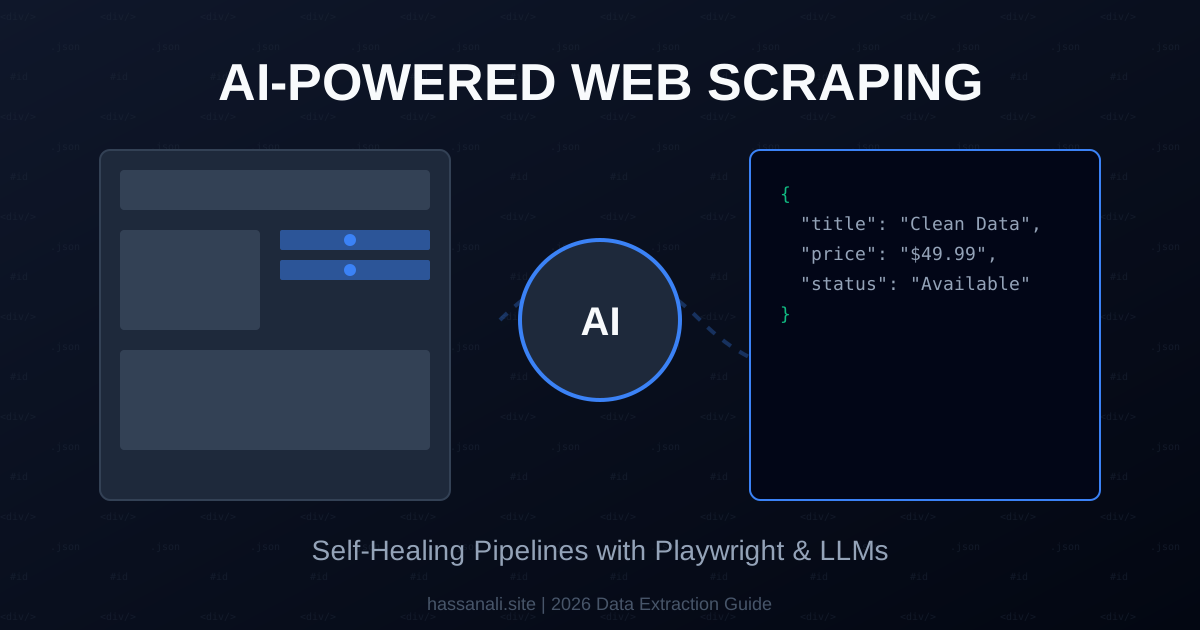
AI-Powered Web Scraping: Combining Playwright, LLMs, and Python for Structured Data
I remember my first attempt at scraping a major e-commerce site back in 2021. I spent three days perfect-tuning my CSS selectors. The client was happy. Twelve hours later, the site updated its class names from .price-tag to .p-val-v2, and my entire pipeline exploded.
It was a fantastic learning experience.
In 2026, we don’t play the “cat and mouse” game with class names anymore. We have moved into the era of Semantic Scraping. By combining the browser automation of Playwright with the reasoning of LLMs, we can build scrapers that understand what they are looking for, not just where it lives in the DOM.
Here is the real, no-BS guide to building self-healing, AI-powered scrapers.
What You’ll Learn
In this technical blueprint, we’ll build a production-ready pipeline that extracts structured data from dynamic websites. You’ll discover:
- The “Self-Healing” Architecture: Why LLM-on-every-page is a mistake
- Setting up Playwright for 2026 JS-heavy environments
- Using Crawl4AI to convert messy DOM into clean Markdown
- Implementing a Python monitor that triggers AI “healing” on failure
- Integrating Zod-like schema validation for your JSON output
Prerequisites
- Python 3.13+ (For the latest async/await improvements)
- Playwright Library (
pip install playwright) - An LLM API Key (OpenAI GPT-4o or Anthropic Claude 3.5 Sonnet)
Step 1: The Self-Healing Pipeline
The biggest mistake developers make in 2026 is running an LLM call for every single page they scrape. It’s too slow and too expensive. Instead, we use the Generator Pattern.
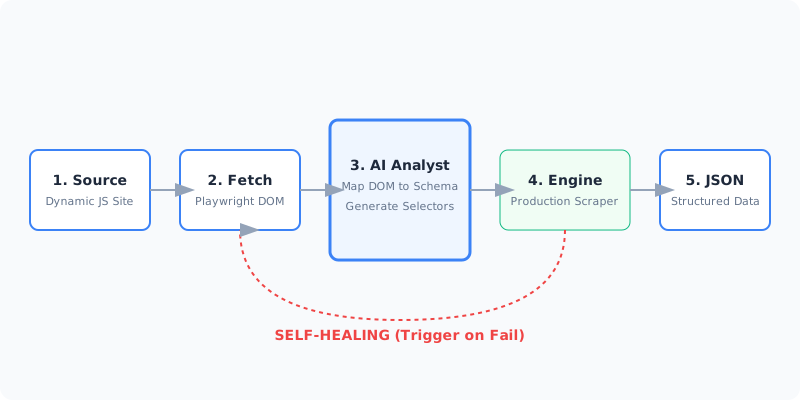
The Logic:
- Analyze: Use an LLM once to look at the page and find the data.
- Generate: The LLM outputs a deterministic Python script (using CSS selectors).
- Execute: Run that script 10,000 times at zero token cost.
- Heal: If the script fails, trigger the LLM to re-analyze and fix the selectors.
Step 2: Fetching the Semantic DOM
Modern sites are essentially blank HTML shells that fill up with data via JavaScript. We use Playwright to wait for the “Network Idle” state before grabbing the content.
import asyncio
from playwright.async_api import async_playwright

async def get_page_content(url):
    async with async_playwright() as p:
        browser = await p.chromium.launch(headless=True)
        page = await browser.new_context(user_agent="Mozilla/5.0...").new_page()

        # Navigate and wait for content to actually load
        await page.goto(url, wait_until="networkidle")

        # Extract the inner HTML
        content = await page.content()
        await browser.close()
        return content

html = asyncio.run(get_page_content("https://example.com/products"))
Step 3: LLM Analysis & Code Generation
Now, instead of manually inspecting the code, we send a snippet to the AI and ask for the extraction logic. We use Zod-style Pydantic schemas to ensure the AI knows exactly what we want.
from pydantic import BaseModel
from typing import List

class Product(BaseModel):
    name: str
    price: float
    sku: str

# System Prompt Strategy
prompt = f"""
I will give you the HTML of a product page.
Identify the CSS selectors for the following fields: {Product.model_json_schema()}
Return ONLY a JSON object mapping field names to selectors.
"""
Step 4: Production-Grade Reliability
In 2026, you must handle anti-bot measures. The “standard” user agent string is no longer enough.
Pro tip: Use Residential Proxies with sticky sessions. Services like Bright Data or Oxylabs allow you to maintain the same IP across the “Analysis” and “Extraction” phases, preventing the site from showing different content to your AI analyzer vs. your extraction engine.
Step 5: Information Gain — The “Vision” Fallback
If the HTML is obfuscated (common on high-security sites), use the Vision Model approach. Take a screenshot with Playwright, send it to a multimodal model (like GPT-4o-vision), and ask it to “Click and Extract.”
# Playwright Vision Step
await page.screenshot(path="site_state.webp", full_page=True)
# Send site_state.webp to LLM...
Tools and Resources
| Tool | Purpose | Link |
|---|---|---|
| Playwright Python | Core browser automation | Playwright.dev |
| Crawl4AI | Markdown-optimized crawler | GitHub |
| Firecrawl | LLM-ready API for scraping | Firecrawl.dev |
Testing Your Implementation
Do not ship a scraper without Schema Verification:
- Run your scraper on 10 random pages from the target domain.
- Pipe the output into your Pydantic model.
- If more than 20% fail validation, trigger the Healing Loop to re-generate selectors.
Common mistakes:
- Mistake 1: Not handling
iframecontent. Playwright needs to switch context to see inside iframes. - Mistake 2: Ignoring
shadow-rootcomponents. Many modern SPAs hide data inside shadow DOMs which standard scrapers can’t see.
Next Steps
Now that your semantic scraper is live, level up your data game:
- Dynamic Content: Learn to trigger “Load More” buttons using Playwright’s
.click()method before extraction. - Data Enrichment: Use the extracted SKUs to automatically query competitor prices via the same pipeline.
- Sentiment Scraping: Pipe your extracted text into a sentiment analysis engine to build a market-mood tracker.
TL;DR
- Semantic is Faster: Scrape based on meaning, not just code.
- Save Tokens: Use AI to generate code, not to extract every line.
- Self-Heal: Build a loop that fixes broken selectors automatically.
- Playwright is Key: You need a full browser for 2026 web apps.
If you found this useful, subscribe to my newsletter below for more AI research, coding tutorials, and no-BS tech insights.
Have a skill recommendation or spotted an error? Reach out on LinkedIn or email me at business@hassanali.site.
Last updated: April 29, 2026