LiteLLM: The Ultimate Open-Source AI Gateway for 100+ LLMs
I spent weeks mapping LLM tooling, and LiteLLM kept popping up as the quiet power tool behind serious GenAI stacks. The more I pulled on the thread, the clearer it became: if you are calling more than one large language model in production, LiteLLM is not a nice-to-have — it is almost mandatory.
Below is exactly how LiteLLM works, who it is for, and how to plug it into a real stack without mental overhead.
Why LiteLLM Matters
When you add OpenAI, Anthropic, Gemini, Bedrock, Groq, and a couple of niche providers to one codebase, you inherit six different APIs, six error formats, six auth flows, and six failure modes. That complexity kills iteration speed, introduces bugs, and makes every provider change a refactor project instead of a config tweak.
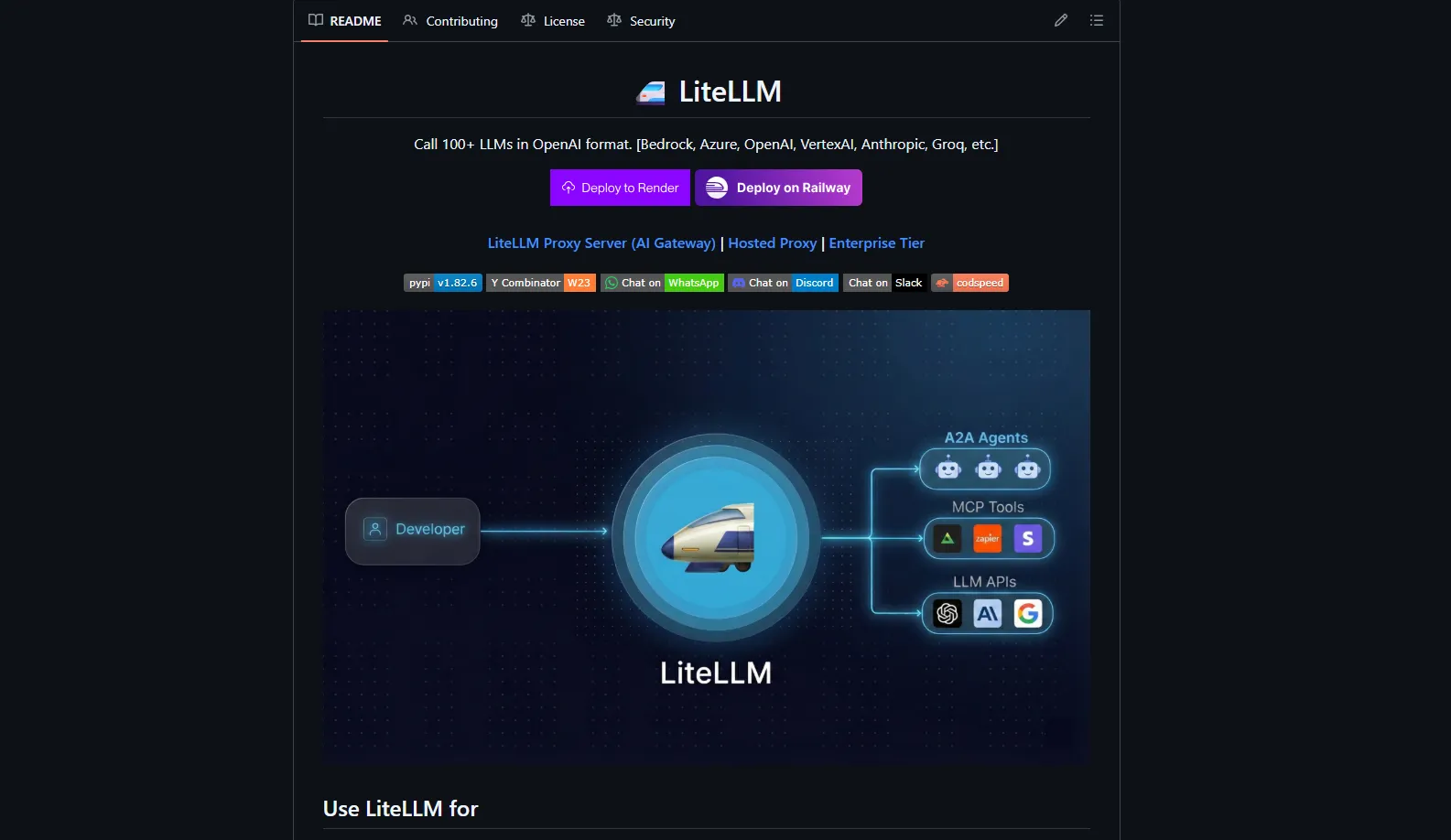
LiteLLM solves that by acting as a universal translator: you speak the OpenAI API format once, and LiteLLM speaks 100+ LLM dialects on your behalf.
What LiteLLM Actually Is
LiteLLM is an open-source Python SDK and AI Gateway that lets you call 100+ LLMs — OpenAI, Anthropic, Bedrock, Vertex AI, Groq, Gemini, Mistral, and many more — using a single OpenAI-compatible interface. It was created by BerriAI, a Y Combinator W23 company, after they discovered that managing multiple LLM providers directly was making their own codebase unmanageable.
You can use LiteLLM in two primary ways:
- Python SDK — installed directly in your application to call any supported model using one consistent
completioninterface - AI Gateway (proxy) — runs as a proxy server exposing an OpenAI-compatible HTTP API that your entire organization uses as a single entry point
For solo developers and small teams, the SDK is usually enough. For org-wide LLM access, cost controls, and governance, the Gateway becomes the main product.
Supported Providers
LiteLLM covers effectively all major providers across chat, embeddings, images, and audio:
- Full-stack (chat, embeddings, images, audio, batches): OpenAI, Azure, Azure AI
- Chat + embeddings: AWS Bedrock, Google Vertex AI, Cohere, HuggingFace, Mistral, IBM Watsonx
- Chat only: Anthropic, Groq, Gemini, DeepSeek, Ollama, Fireworks AI, Together AI, xAI, Perplexity, OpenRouter, Databricks, Replicate, Sambanova, Snowflake, VLLM, LM Studio, and dozens more
- Audio: AssemblyAI, Deepgram, ElevenLabs
- Images: Fal AI, Recraft, Vertex AI
In practice, that coverage means when a new model becomes price-competitive or performance-competitive, you swap a model string instead of rewriting your integration layer.
Key Technical Superpowers
LiteLLM is not just a pass-through proxy. It adds real operational value in production:
- Router with retry and fallback — define a list of candidate models or deployments; LiteLLM automatically retries on failures, timeouts, throttling, or rate limits (e.g., Azure OpenAI → OpenAI direct)
- Observability callbacks — integrates with Lunary, MLflow, Langfuse, LangSmith, and others, plus Prometheus metrics out of the box with a ready-made
prometheus.yml - Built-in guardrails — works at the model level for both streaming and non-streaming calls, with configurable
policy_templates.json - Data persistence — uses Prisma ORM with a detailed
schema.prismato store keys, spend, and metadata in Postgres - Multi-worker control plane — added in v1.82.6, coordinate multiple proxy workers behind one logical gateway
A2A Agent Protocol and MCP Gateway
Most teams are now building AI agents, not just single prompts. LiteLLM leans into that reality.
It implements an A2A Agent Protocol layer so you can invoke agent systems like LangGraph, Vertex AI Agent Engine, Azure AI Foundry, Bedrock AgentCore, and Pydantic AI through the same proxy surface. It also doubles as an MCP (Model Context Protocol) Gateway, connecting any MCP server to any LLM and shipping a ready-made Cursor IDE integration configuration.
The result: a single gateway for both LLMs and tools — your application talks to LiteLLM, and LiteLLM orchestrates agents, tools, and providers in the background.
Performance Numbers
LiteLLM is optimized for latency, not just compatibility. According to the latest benchmarks, it reaches around 8ms P95 latency at 1,000 requests per second — competitive for a proxy layer sitting in front of external LLM APIs.
That matters if you are building real-time user experiences, streaming chat, or agents that chain multiple calls, because every millisecond added at the gateway level gets multiplied down the call stack.
Repository Structure
The repo layout signals this is a full platform, not a weekend project:
| Directory | Purpose |
|---|---|
litellm/ | Core Python package |
litellm-js/ | JavaScript SDK |
litellm-proxy-extras/ | Proxy-specific extras |
ui/ | Next.js admin dashboard |
enterprise/ | Enterprise-only features |
cookbook/ | Practical examples and notebooks |
tests/ | Test suite |
Key config files include model_prices_and_context_window.json (~1.3MB of pricing and context window data), policy_templates.json, and provider_endpoints_support.json — production-grade assets, not demos.
Latest Release: v1.82.6.dev.1 (March 2026)
The most recent development build adds:
- Multi-worker control plane for horizontal scaling
- MCP team management with per-member granular permissions and a Team MCP Server Manager role
- Search tools with object-level access control
- Fixes for Langfuse OTEL traceparent propagation
ANTHROPIC_AUTH_TOKENandANTHROPIC_BASE_URLenvironment variable supportAZURE_DEFAULT_API_VERSIONfor default proxy API behavior- MCP dependency upgrade to v1.26.0
- Six new contributors in one release — a healthy signal
Who Is Already Using It
Notable users include Stripe, Netflix, and OpenAI’s own Agents SDK, plus Google ADK, Greptile, and OpenHands. If it sits in the hot path of systems that are this sensitive to latency, reliability, and security, the quality bar is real.
Enterprise Tier
LiteLLM runs a dual model: the core is open-source, but certain features fall under a LiteLLM Commercial License delivered in an enterprise tier. That tier bundles:
- Custom integrations and SSO
- Priority feature development
- Dedicated Slack or Discord support
- Custom SLAs
Teams typically book a demo and negotiate an arrangement that fits their compliance and support needs.
The Seven Problems LiteLLM Removes
- Provider lock-in — swap GPT-4 → Claude → Gemini by changing one model string
- Inconsistent APIs — all responses normalized to OpenAI format; downstream code never cares which provider responded
- No fallback — router retries across deployments automatically on failure or rate limits
- Zero cost visibility — token spend tracked per key, user, and team, written to Postgres, exposed via
x-litellm-response-costheader - Rate-limit pain — parallel request limiter tracks TPM and RPM per virtual key
- Vendor error formats — provider error codes normalized to OpenAI-compatible shapes
- Observability and MCP complexity — plugs into tracing stacks and acts as MCP Gateway from one endpoint
Three Levels of Usage
Level 1 — Python SDK (Solo Dev)
from litellm import completion

# OpenAI
response = completion(model="openai/gpt-4o", messages=[{"role": "user", "content": "Hello"}])

# Switch to Anthropic — zero other changes
response = completion(model="anthropic/claude-sonnet-4-20250514", messages=[{"role": "user", "content": "Hello"}])

# Switch to Gemini — same
response = completion(model="gemini/gemini-2.0-flash", messages=[{"role": "user", "content": "Hello"}])

print(response.choices[0].message.content)
The ModelResponse structure is always identical regardless of provider.
Level 2 — AI Gateway Proxy (Teams)
pip install 'litellm[proxy]'
litellm --model gpt-4o
# → OpenAI-compatible endpoint at http://0.0.0.0:4000
Point your existing OpenAI SDK client at this URL by updating base_url and api_key. Your apps believe they are still talking to OpenAI while LiteLLM routes traffic to whatever backends you configure.
Level 3 — Full Enterprise Stack (Docker)
# docker-compose.yml (simplified)
services:
  litellm:
    image: ghcr.io/berriai/litellm:main-latest
    ports:
      - "4000:4000"
    environment:
      - DATABASE_URL=postgresql://...
      - REDIS_URL=redis://redis:6379
  postgres:
    image: postgres:15
  redis:
    image: redis:7
  prometheus:
    image: prom/prometheus
Traffic path in this setup:
Client
  → AI Gateway (auth, rate limiting, budgets)
    → Router (load balance + fallback)
      → LiteLLM SDK (format translation)
        → LLM Provider API
Virtual Keys and Guardrails
The governance layer is what makes LiteLLM enterprise-ready:
- Issue virtual API keys (
sk-xxxx) per project, user, or team with spend limits, allowed model lists, and expiry dates - Background jobs flush spend data to Postgres; weekly or monthly Slack spend reports keep finance teams informed
- Guardrails run pre- or post-call with policy templates for content filtering, PII redaction, and compliance enforcement
- Each provider has its own
transform_request/transform_responselogic — cleanly modular and testable
When LiteLLM Is a No-Brainer
| Signal | Recommendation |
|---|---|
| Using 3+ LLM providers | ✅ No-brainer |
| Multiple teams calling LLMs | ✅ No-brainer |
| Need per-team budgets + access control | ✅ No-brainer |
| Security team wants a single LLM egress point | ✅ No-brainer |
| Single provider, single small app | ⏸️ Start simple, add LiteLLM when you feel the friction |
Risks and Gaps
- Dev releases (
v1.82.6.dev.1) are explicitly unstable — pin stable Docker tags for production - A2A and MCP APIs are experimental; treat their contracts as evolving
- Dependency surface —
poetry.lockis ~680KB; run active supply chain scanning - Commercial license — not everything is unrestricted open-source; read the license before embedding enterprise features in a commercial product
Actionable Setup Sequence
- Single-service app —
pip install litellm, swap your OpenAI client forlitellm.completion, verify you can call two providers from the same code path - Local proxy —
pip install 'litellm[proxy]'+litellm --model gpt-4o, point one existing client at it, confirm nothing breaks - Containerize — use the official Docker image, add Postgres + Redis, configure virtual keys, rate limits, and basic guardrails
- Add observability — wire LiteLLM callbacks into Langfuse or MLflow, export metrics to Prometheus
- Enterprise audit — review the Commercial License, identify which enterprise features you depend on (SSO, advanced guardrails, SLAs), decide on the enterprise tier
If you found this useful, subscribe to my newsletter below for more AI research and insights.